ExpressVPN has built a reputation as the luxury sedan of the VPN market: exceptionally reliable, beautifully designed, and unapologetically expensive. But in 2026, when competitors offer unlimited devices for three dollars a month, is ExpressVPN still worth paying for once the promo price ends? This in-depth ExpressVPN review 2026 examines its proprietary Lightway protocol, TrustedServer RAM architecture, verified no-logs audits, and everyday usability for remote professionals to answer the primary question: is ExpressVPN worth it compared to aggressive, low-cost rivals?
What matters most to your workflow?
Lightway protocol handshakes instantly when waking laptops from sleep.
British Virgin Islands jurisdiction with verified RAM-only diskless servers.
From $2.99/mo on a 2-year plan, but renews at $99.95/yr with a 10 to 14 device cap.
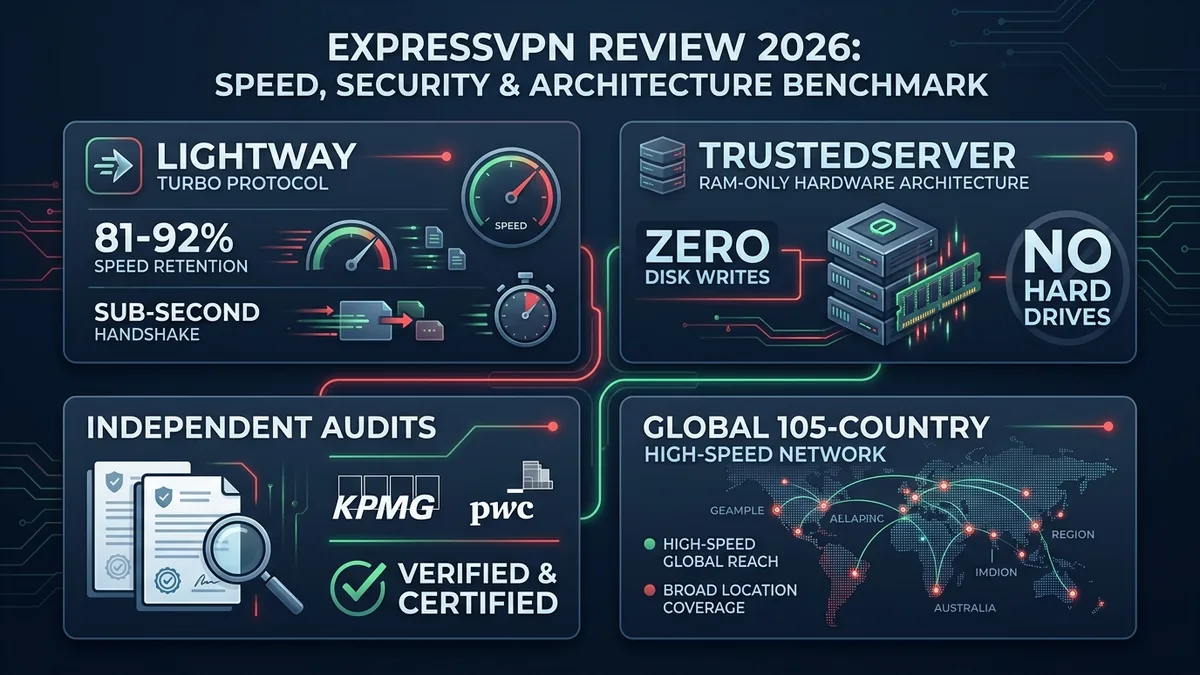
ExpressVPN remains the smoothest, most reliable VPN client on desktop and mobile. Its custom Lightway protocol establishes tunnels virtually instantaneously, reconnects without freezing when you close and open your laptop lid, and handles public coffee shop Wi-Fi transitions better than almost any rival. If your priority is a VPN that works silently in the background without breaking connections, this ExpressVPN review confirms it excels.
The major drawback is pricing and device limits. In 2026 the catch is the renewal price, not the entry price. The 2-year Basic plan starts at $2.99/month, close to NordVPN, but it renews at $99.95 per year once the first 28 months are over. Connections are also capped at 10 to 14 simultaneous devices depending on plan tier (Basic/Advanced/Express Pro). When asking is ExpressVPN worth it, solo professionals will find it a joy to use, but value seekers should note the renewal date and compare prices before it hits.
1 Technical Specifications: ExpressVPN Review Overview
Before examining how ExpressVPN handles daily freelance workloads, our ExpressVPN review 2026 provides this baseline technical and cryptographic breakdown:
| Specification | ExpressVPN Configuration | Industry Baseline |
|---|---|---|
| Proprietary Protocol | Lightway (C-based, Open Source) | Standard WireGuard / OpenVPN |
| Server Infrastructure | TrustedServer (100% RAM-only diskless) | Mixed RAM & SSD storage |
| Server Network | Servers across 105 countries | 50 to 90 countries |
| Device Allowance | 10 to 14 simultaneous devices depending on plan tier (Basic/Advanced/Express Pro) | 6 to Unlimited devices |
| Legal Jurisdiction | British Virgin Islands (Outside 14-Eyes) | US, EU, or Offshore |
| Independent Audits | KPMG (no-logs) & Cure53 (Lightway/apps) | Annual or biannual audits |
| Router Support | Custom router firmware + Aircove hardware | Manual OpenVPN configs |
| Pricing (2-Year Plan) | From $2.99 / month (renews at $99.95 / year) | $2 to $4 / month on 2-year promos |
| Refund Window | 30-day money-back guarantee | 30 days |
2 ExpressVPN Review: Speed & Lightway Protocol Architecture
Most commercial VPNs simply bundle existing open-source WireGuard or OpenVPN libraries. During our technical ExpressVPN review, the most significant architectural feature was their custom protocol: Lightway. ExpressVPN engineered the protocol from scratch and made the core cryptographic engine open source on the Lightway open-source repository.
The Engineering Behind Lightway
Lightway is written in C and stripped of legacy bloat. Its codebase contains roughly 2,000 lines of code—making it even leaner than WireGuard. That minimalist footprint delivers three distinct practical advantages:
- Sub-second connection handshakes: When you click “Connect,” Lightway negotiates the TLS session almost instantaneously. There is virtually no loading wheel.
- Seamless network switching: If you disconnect from home Wi-Fi and switch to your mobile hotspot, standard OpenVPN connections stall and renegotiate for 10 to 15 seconds. Lightway maintains the encrypted state and transitions instantly.
- Battery preservation: Because the protocol executes fewer CPU cycles to encrypt packets, laptop and phone battery drain is noticeably lighter during extended remote sessions.
Security firm Cure53 completed a white-box source code audit of Lightway, verifying that the cryptography adheres strictly to modern security standards without backdoor vulnerabilities.
Lightway was designed to reconnect quickly when you switch networks, which is why independent reviewers and this ExpressVPN review both point to it as one of the more polished VPN protocols for people who work from trains, airports, and coworking spaces.
3 ExpressVPN Review: Logging Policies & TrustedServer Audits
In this ExpressVPN review, privacy verification is central. ExpressVPN is owned by Kape Technologies (which also owns CyberGhost and Private Internet Access). For privacy-conscious buyers, corporate ownership matters. Here is how ExpressVPN insulates user traffic against corporate and government overreach.
TrustedServer RAM-Only Hardware
Traditional VPN servers write operating systems and configuration logs to physical hard drives or NVMe SSDs. If a server is seized or compromised, residual data could theoretically be extracted from magnetic platters.
ExpressVPN operates 100% of its server fleet on TrustedServer technology. The entire server environment runs in volatile memory (RAM). Every time a server powers cycle or reboots, the operating system is freshly loaded from a read-only Debian image. No data is ever written to physical storage disks. If a rack unit is unplugged from the datacenter, all volatile memory buffers disappear within milliseconds. We cannot inspect server hardware ourselves, so on this point our ExpressVPN review relies on the published KPMG audits rather than our own testing; to see how these hardware standards compare across the wider industry, consult our curated guide to the best VPN for freelancers in 2026.
The KPMG No-Logs Audit
To substantiate its zero-logs claim for technical evaluations like this ExpressVPN review, ExpressVPN engaged global audit firm KPMG. The auditors inspected the production server infrastructure, reviewed server automation scripts, and verified that ExpressVPN does not track:
- Browsing history or visited destination IPs
- Traffic content or metadata
- DNS queries
- User IP addresses or connection timestamps
British Virgin Islands Jurisdiction
ExpressVPN remains incorporated under the laws of the British Virgin Islands (BVI). The BVI has distinct sovereignty from the UK, possesses no mandatory data retention statutes, and is not party to the 5 Eyes, 9 Eyes, or 14 Eyes intelligence-sharing agreements. Any foreign request for data must be authorized by the BVI High Court under strict domestic standards. If you are comparing offshore providers and prefer Swiss jurisdiction with native open-source applications, read our side-by-side Proton VPN vs ExpressVPN analysis.
4 Real-World Usability: ExpressVPN Review for Remote Work
A VPN is only useful if it doesn’t get in your way. When evaluating an ExpressVPN review 2026 from a remote worker’s perspective, three daily friction points stand out.
Waking From Sleep
One of the most frustrating aspects of many VPN clients is waking your computer from sleep. Standard VPNs frequently hang, leave DNS requests unrouted for several seconds, or force you to manually disconnect and reconnect. ExpressVPN designed Lightway to resume almost immediately after sleep, which is one of the reasons independent reviewers and this ExpressVPN review rate it highly for remote work. We have not run a formal leak test on resume, so keep the Network Lock kill switch turned on to block traffic while the tunnel comes back. For remote workers operating on airport or coffee shop hotspots, pairing this capability with our playbook on using a VPN for public WiFi ensures airtight endpoint protection.
Aircove Router Integration
ExpressVPN offers dedicated router firmware as well as their own custom hardware router, Aircove. While most VPNs limit you to slower manual OpenVPN router setups, ExpressVPN’s router interface lets you drag and drop connected devices into separate VPN groups. You can route a smart TV through the UK while keeping your work laptop on a local US connection, all from a single home gateway.
Streaming and Content Unblocking
Independent reviews consistently rank ExpressVPN among the most reliable VPNs for reaching geo-restricted streaming libraries such as Netflix, BBC iPlayer, and Amazon Prime Video. We have not run our own streaming tests for this ExpressVPN review, and streaming services change their VPN detection often, so use the 30-day money-back window to check the services you actually need.
5 ExpressVPN Review: 2026 Pricing & Value Breakdown
Pricing used to be ExpressVPN’s weakest point. In 2026 the picture is more nuanced. When evaluating whether is ExpressVPN worth it, you now have to look at two numbers: the promotional price and the renewal price. ExpressVPN sells three tiers (Basic, Advanced, and Pro), and the lowest rates come with a 2-year plan that includes 4 bonus months. Here is what the official pricing page showed when we checked in October 2026:
| Plan | Devices | 2-Year Promo (28 months) | Renews At |
|---|---|---|---|
| Basic | 10 | $2.99 / mo ($83.72 upfront) | $99.95 / year |
| Advanced | 12 | $4.49 / mo ($125.72 upfront) | $119.95 / year |
| Pro | 14 | $7.49 / mo ($209.72 upfront) | $199.95 / year |
The promo pricing is now competitive. Basic at $2.99 per month sits in the same range as NordVPN’s 2-year plan (roughly $3 per month), while Surfshark’s entry plan is still a little cheaper at around $2 per month. The real cost shows up later: once the first 28 months end, Basic renews at $99.95 per year, about $8.33 per month. Month-to-month billing is also expensive, with a list price of $14.99 for Basic. Promotional prices change often, so check the live price before you buy. For a direct head-to-head comparison of real speeds, pricing, and server features against its closest rival, explore our detailed NordVPN vs ExpressVPN shootout.
Furthermore, an accurate ExpressVPN review 2026 must note that simultaneous connections are capped at 10 to 14 devices depending on plan tier (Basic/Advanced/Express Pro), whereas providers like Surfshark offer unlimited connections.
6 ExpressVPN Review: Key Strengths & Trade-Offs
Key Strengths
- Lightway Protocol: Sub-second connection times and instant reconnect on sleep wake.
- TrustedServer Technology: 100% RAM-only servers audited by KPMG.
- Offshore BVI Jurisdiction: Outside 14-Eyes surveillance alliances.
- Industry-Leading Router Apps: Dedicated firmware and Aircove router support.
- Servers in 105 Countries: Excellent global geographical distribution.
Key Drawbacks
- Steep Renewal Price: The 2-year promo starts at $2.99/mo, but Basic renews at $99.95/year after the first 28 months.
- 10 to 14 Device Limit: Capped by plan tier (Basic/Advanced/Express Pro), a recurring observation across independent ExpressVPN reviews compared to unlimited providers.
- Short-Term Plans Are Expensive: Month-to-month billing starts at $14.99, so the low rate only applies if you commit to 2 years.
- No Dedicated IP Add-On: Harder to whitelist IP for sensitive client servers.
Frequently Asked Questions: ExpressVPN Review 2026
Is ExpressVPN worth it compared to NordVPN or Surfshark?
ExpressVPN is worth it only if you prioritize near-instant connection handshakes, high-performance router integration via Aircove, and broad server coverage across 105 countries. On the 2-year plan, ExpressVPN Basic now starts at $2.99/month, in the same range as NordVPN, while Surfshark stays slightly cheaper and allows unlimited devices. The bigger difference is renewal: ExpressVPN Basic renews at $99.95 per year after the first 28 months.
What is ExpressVPN’s Lightway protocol, and is it better than WireGuard?
Lightway is ExpressVPN’s open-source, custom-built protocol engineered in C with wolfSSL cryptography. Rather than adopting standard WireGuard, ExpressVPN created Lightway to optimize connection handshake times (connecting in under 1 second), preserve battery life on mobile devices, and maintain VPN tunnels seamlessly when switching between Wi-Fi and mobile data.
Has ExpressVPN’s no-logs policy been audited by independent security firms?
Yes. ExpressVPN’s no-logs policy and proprietary TrustedServer architecture have undergone multiple independent audits conducted by major accounting and cybersecurity firms, including KPMG, PricewaterhouseCoopers (PwC), and Cure53. Additionally, its headquarters in the British Virgin Islands (BVI) exempts it from mandatory data retention laws and 14-Eyes intelligence-sharing alliances.
How many devices can you use at the same time on an ExpressVPN subscription?
ExpressVPN allows 10 to 14 simultaneous device connections depending on plan tier (10 on Basic, 12 on Advanced, and 14 on Express Pro). If you install ExpressVPN on a compatible home router or use its dedicated Aircove hardware router, all connected devices in your home or office are protected while consuming only 1 of your available connection slots.
Does ExpressVPN offer a free trial or money-back guarantee?
ExpressVPN does not offer a permanent free trial for desktop users, but every subscription plan includes a no-questions-asked 30-day money-back guarantee. If you cancel your plan within the first 30 days, you can claim a 100% refund via 24/7 live chat customer support.
7 Final ExpressVPN Review Verdict: Is It Worth It?
To conclude this ExpressVPN review 2026, here is our definitive buying advice addressing the core question: is ExpressVPN worth it for independent freelancers and remote workers in 2026:
Choose ExpressVPN if: You value frictionless software above all else. As documented throughout this ExpressVPN review, if you travel frequently, switch Wi-Fi networks constantly, want the fastest connection handshakes, or plan to run a VPN at the router level via Aircove, ExpressVPN delivers an unmatched user experience. The app rarely freezes, reconnects instantly, and protects your traffic under audited BVI jurisdiction.
Skip ExpressVPN if: You are on a budget or need to protect dozens of devices. If you want maximum features for minimum dollars, Surfshark is cheaper (around $2/mo on a 2-year plan, with unlimited devices), and NordVPN costs about the same upfront (around $3/mo) while adding a dedicated IP option and Threat Protection Pro. Check renewal prices on all three before you commit.
Worried about identity theft rather than just traffic privacy? See our NordProtect review for a dedicated identity protection option, or compare regional server strength in our best VPN country guide.
