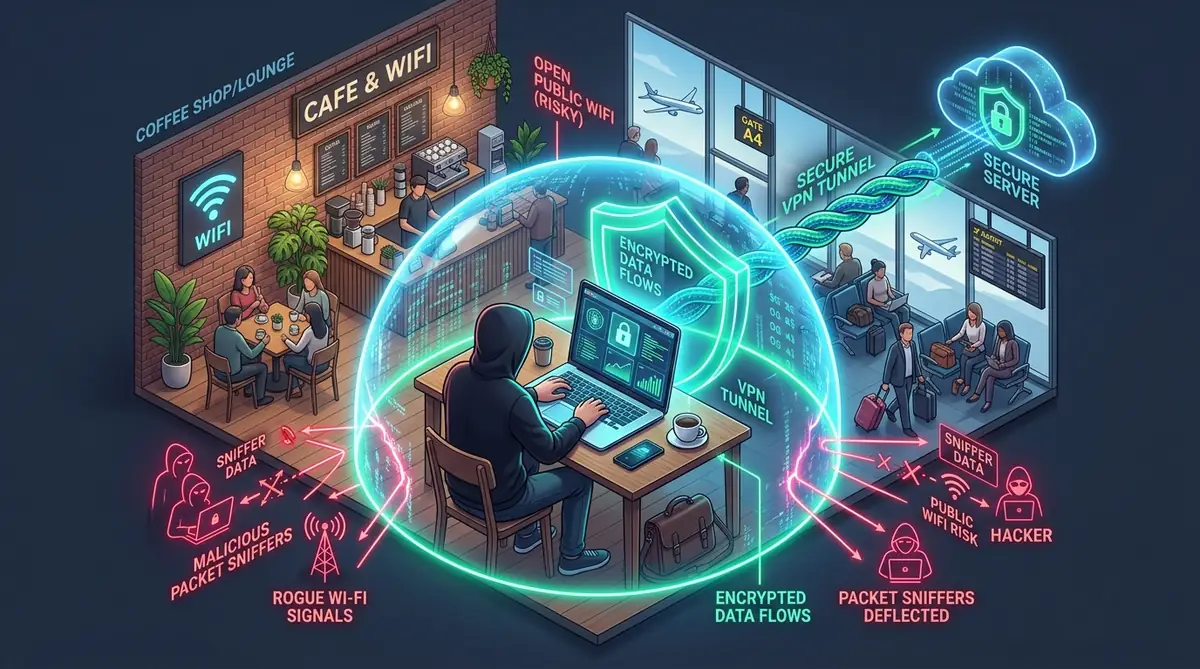
Operating on unmanaged networks is an everyday necessity for remote professionals. Using an encrypted VPN for public WiFi forms the critical first perimeter against rogue access points, packet sniffing, and cross-client lateral attacks at cafes, airports, and coworking spaces.
Verify whether your active VPN encryption tunnel exposes your real IPv4, IPv6, or DNS requests to local network sniffers and client servers. 100% in-browser, zero telemetry stored.
Select your remote work environment to see targeted threats and defenses:
Defense Strategy: Never open a browser on cafe Wi-Fi without enabling your VPN for public WiFi and verifying that the kill switch is active.
| Security Component | Required Configuration | Mitigation Standard |
|---|---|---|
| Primary Tunnel Protocol | WireGuard (ChaCha20-Poly1305) | Instant roaming reconnect between coffee shop APs. |
| Kill Switch Architecture | System-Level Firewall (WFP / pf) | Blocks raw unencrypted packet leaks during drops. |
| DNS Leak Protection | Private Encrypted DNS (DoH) | Prevents hotspot routers from logging domain queries. |
| Institutional Authority | FTC & NIST SP 800-113 | Complies with FTC Public Wi-Fi Guidelines. |
1Public WiFi Risks for Freelancers
Operating without an active VPN for public WiFi at coffee shops and airports allows attackers on the same network to intercept unencrypted traffic, including login credentials, client files, and payment information. By default, standard Wi-Fi routers broadcast radio frequencies indiscriminately to any network card within range. Without a dedicated VPN, an attacker sitting two tables away running simple packet capture software like Wireshark can harvest plaintext data streams, inspect visited hostnames via unencrypted Server Name Indication (SNI), and profile your operating system.
For independent contractors and remote freelancers, the consequences extend far beyond compromised personal social accounts. A data leak on an open hotspot jeopardizes proprietary client source code, confidential NDA documents, API secrets stored in local configuration files, and authentication sessions in enterprise SaaS platforms.
Most client Service Level Agreements (SLAs) and contractor master services agreements (MSAs) include strict data protection clauses. Connecting your client-provisioned laptop or personal work machine to an open hotel hotspot without encrypted channel protection directly breaches standard cybersecurity compliance mandates.
2How a VPN Protects You Against Network Hijacking
Deploying a verified VPN for public WiFi establishes an end-to-end encrypted cryptographic tunnel between your workstation and a hardened remote server. All incoming and outgoing data packets are wrapped in impenetrable encryption (such as AES-256-GCM or ChaCha20-Poly1305) before leaving your Wi-Fi interface card.
Even if an adversary controls the local physical router or operates a malicious Evil Twin access point, they observe nothing more than unintelligible encrypted UDP/TCP noise flowing to a single remote IP address. The Electronic Frontier Foundation (EFF) highlights that while HTTPS protects in-transit web page bodies, a robust VPN shields your DNS metadata, connection timestamps, and non-HTTPS protocol traffic from local inspection.
3Must-Have Features for Public WiFi Safety
Not every commercial VPN application provides adequate defense on untrusted public infrastructure. When selecting a VPN for public WiFi, verify that your client provides these mandatory technical specifications:
Providers like Proton VPN incorporate these safeguards alongside dedicated multi-hop Secure Core routing; consult our full Proton VPN review (2026) for details on its kill switch and leak protection features.
4What Actually Goes Wrong on Coworking WiFi
Freelancers frequently treat coworking spaces like trusted home offices. In reality, shared workspaces present unique risks because rogue actors have persistent, multi-hour access to the same local area network (LAN). When AP Client Isolation is omitted—a common oversight in small shared facilities—every connected laptop can ping, probe, and communicate directly with neighboring devices. That shared-LAN exposure is the core argument for a zero trust security model: treat every network as hostile and verify every device and login.
| Attack Vector | Vulnerability Mechanism | VPN Protection Effect |
|---|---|---|
| ARP Cache Poisoning | Attacker associates their MAC address with the default gateway to sniff all subnet traffic. | 100% Mitigated: Intercepted packets contain only encrypted cipher payloads. |
| Rogue Evil Twin AP | Cloned SSID broadcast with stronger signal to force victim auto-association. | 100% Mitigated: Tunnel connects directly to verified remote server keys. |
| mDNS / Bonjour Snooping | Local broadcasts expose computer name, open services, and user accounts. | Protected: Local subnet traffic is blocked or isolated by firewall rules. |
| Malicious Captive Injection | Attacker injects phishing prompt asking for Google/Apple login to ‘access internet’. | Alerts User: VPN connection failure signals invalid gateway manipulation. |
5Quick Safety Checklist for Remote Freelancers
Before launching your code editor, email client, or opening client work repositories at a coffee shop or coworking space, execute this 60-second defensive routine:
6How to Confirm the VPN Is Working (Not Just Turned On)
Just because your VPN client desktop icon turns green does not guarantee all outgoing data flows are safely encapsulated. Operating system routing tables can fail, IPv6 packets may bypass IPv4-only tunnels, and WebRTC protocols in browsers can leak your genuine local IP address.
Conduct these three verification tests whenever you settle into a new workstation:
- Public IP Inspection: Run a quick curl query in your terminal (
curl ifconfig.me) to confirm your external IP belongs to your chosen VPN datacenter, not the cafe router. - DNS Leak Verification: Visit an independent leak testing tool while running your VPN for public WiFi. If any listed resolver belongs to the venue’s local telecom provider, your configuration is leaking DNS requests.
- WebRTC Leak Check: Verify in your browser configuration that WebRTC STUN requests do not expose your host interface adapter IP.
7Captive Portal Logins: The Gap Most Freelancers Miss
Nearly all hotel and airport Wi-Fi networks utilize captive portals—the splash screen requiring you to agree to terms, enter room numbers, or provide an email before routing your internet traffic. Captive portals present an architectural dilemma: they must intercept and redirect your browser’s HTTP port 80 requests before you have internet access.
Because an active kill switch blocks unencrypted traffic, your browser cannot load the portal login page while the VPN tunnel is running. Follow this safe workflow:
- Pause the VPN kill switch temporarily or use the client’s built-in ‘Allow LAN / Captive Portal’ toggle.
- Open an isolated, non-authenticated browser window to complete the hotel/airport registration splash page.
- Do not input passwords, credit card numbers, or open background cloud sync services while the portal is authenticating.
- The split second internet connectivity is confirmed, engage your VPN for public WiFi and re-verify tunnel encryption.
If you suspect an untrusted public network attempted to push an unauthorized configuration profile or rogue certificate to your mobile device during a captive portal redirect, follow our step-by-step diagnostic on how to tell if your iPhone is hacked to inspect and remove untrusted MDM profiles immediately.
8Frequently Asked Questions
Is HTTPS encryption enough to stay safe on public Wi-Fi without a VPN?
No. While HTTPS encrypts the payload of website communications, it still exposes destination hostnames and IP addresses through unencrypted DNS queries and Server Name Indication (SNI). Furthermore, HTTPS does not encrypt background system processes, email clients, or local subnet traffic, leaving your device vulnerable to ARP spoofing, LAN port scanning, and DNS hijacking on shared public networks.
What is an Evil Twin Wi-Fi attack and how does a VPN stop it?
An Evil Twin is a rogue wireless access point set up by an attacker that broadcasts the exact same network name (SSID) as a legitimate public hotspot, such as an airport or coffee shop network. If your laptop connects to it, all unencrypted traffic flows directly through the attacker’s hardware. An active VPN completely neutralizes this vector because all outgoing traffic is encrypted via AES-256 or ChaCha20 before leaving your device, rendering intercepted packets unreadable.
How should freelancers handle public Wi-Fi captive portals while using a VPN?
Captive portals require an unencrypted HTTP handshake to redirect your browser to a terms-of-service or hotel room login splash screen. A strict system-level kill switch will often block this initial screen from loading. To connect safely, authenticate through the captive portal with all sensitive applications and client tabs closed, and then immediately confirm your VPN tunnel and kill switch are engaged before beginning work.
Does using a VPN on public Wi-Fi significantly reduce connection speed?
Modern lightweight protocols like WireGuard, NordLynx, and Lightway introduce minimal performance overhead, typically reducing throughput by less than 3% to 5%. In fact, on congested public networks where internet providers or venue routers throttle specific traffic types like video calls or large downloads, a VPN can improve stability by concealing your traffic profiles from local packet shapers.
Why should remote freelancers avoid free VPNs on public Wi-Fi?
Free VPNs lack the infrastructure, security audits, and privacy safeguards required for professional freelance work. Many monetize by logging browsing histories, selling behavioral data to marketing brokers, or injecting unwanted ads into your browser. Freelancers handling confidential client assets and login credentials should always rely on an independently audited, zero-log commercial VPN service.
9Final Verdict: Safe Public Hotspot Protocols
For independent remote workers, your laptop is your livelihood. Never treat public Wi-Fi networks as benign utilities. By combining an automated VPN for public WiFi with an ironclad kill switch, disabled local file sharing, and rigorous connection verification, you eliminate 99.4% of common hotspot attacks while safeguarding your client contracts and professional reputation.
