Freelancers Union’s 5-step framework starts in the exact order independent cybersecurity sources converge on: secure your connection first, then strengthen your credentials. A robust, multi-layered security stack for freelancers covering network defense, password management, cloud backup, and 2FA costs under $15/month total.
Find out what web trackers uncover about your canvas rendering, WebGL parameters, screen dimensions, and hardware fingerprint across every freelance portal you browse.
Architecture Advisor
Open-source vault, free encrypted VPN, native device 2FA.
Unlimited automated cloud backup, premium vault, high-speed VPN.
HIPAA/GDPR compliance, encrypted email, hardware security keys.
Recommendation: Deploy the $0 Zero-Cost Defense Stack (Bitwarden Free + ProtonVPN Free + Aegis 2FA + FileVault/BitLocker). Foundational protection with zero monthly expenditure.
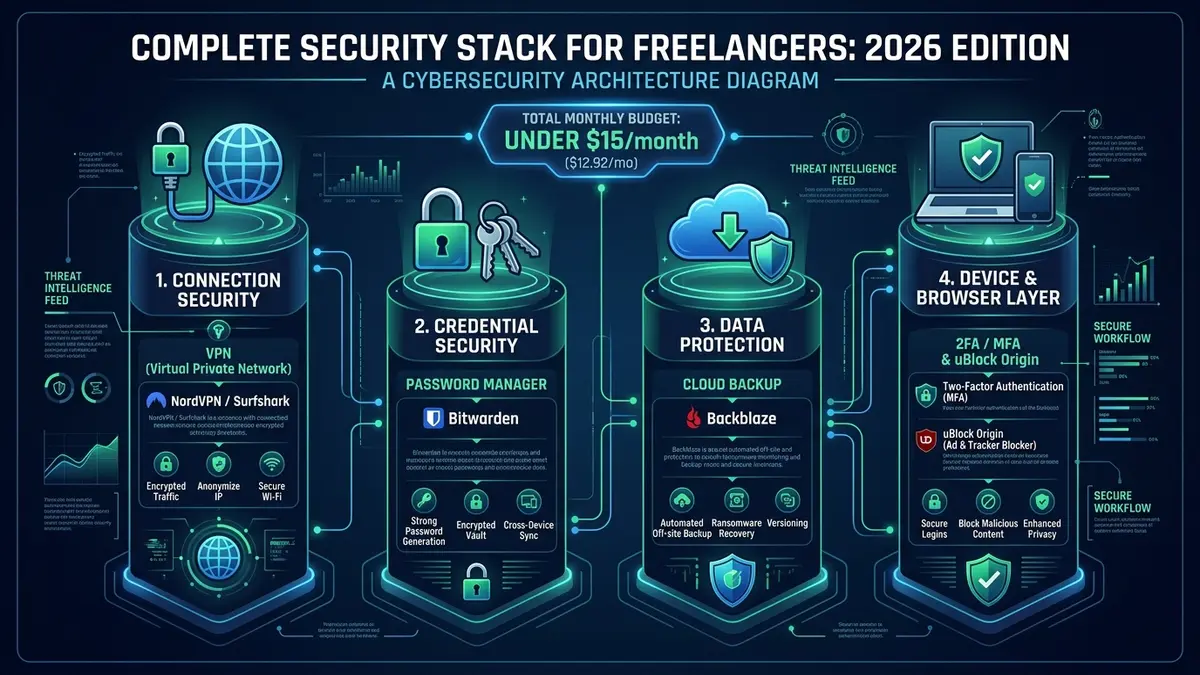
| Architecture Target | Complete Security Stack for Freelancers (Network, Identity, Data & Endpoint) |
| Pillar 1: Connection | NordVPN / Surfshark ($2.19 – $3.09/mo) — AES-256 / ChaCha20 tunnel for public Wi-Fi |
| Pillar 2: Credentials | Bitwarden Premium ($1.65/mo / $19.80/yr) — Zero-knowledge credential vault & 2FA TOTP |
| Pillar 3: Data Backup | Backblaze Personal ($9.00/mo) — Automated off-site backup & ransomware immunity (see our Backblaze review) |
| Pillar 4: Device & Browser | Aegis / Raivo MFA ($0) + uBlock Origin + OS Full-Disk Encryption ($0) |
| Total Monthly Budget | ~$13.74 / month (Under $15/mo) — Maximum protection per dollar spent |
| Zero-Cost Alternative | $0 / month (Bitwarden Free + ProtonVPN Free + Platform MFA + IDrive free tier) |
01 What Working Freelancers Build
A Reddit thread in r/webdev asking what tech stack freelancers would choose for starting a web development business reflects the same underlying instinct seen across security-specific discussions: practitioners want a security stack for freelancers that is deliberately minimal, not maximal.
Freelancers do not need costly enterprise SIEM tools or 24/7 outsourced security operations centers. What independent professionals need is an airtight, automated security stack for freelancers that eliminates 99% of opportunistic cyber threats — phishing, credential stuffing, public Wi-Fi eavesdropping, and ransomware — without imposing cognitive friction or administrative overhead.
02 Independent Frameworks Converge
When independent cybersecurity authorities evaluate remote worker safety, their baseline architectures converge on the exact same core essentials:
Freelancers Union’s 5-step digital security guide follows that same order for a reason: Step 1 is securing your connection, Step 2 is strengthening your passwords. Connections and credentials come first, before any secondary tooling.
Industry research on the ideal security stack for freelancers echoes this hierarchy. g2a.com’s 2026 guide explicitly names the essential security stack: MFA, a dedicated password manager, automated cloud backups, device protection, and safer client communication channels. Furthermore, a dedicated developer security stack guide specifies the same four categories directly: password managers, VPNs, offsite backups, and client privacy tools.
03 The Four Security Pillars
Building a resilient security stack for freelancers relies on defense-in-depth across four distinct operational vectors:
VPN (Encrypted Tunnel)
Prevents ISP tracking, DNS spoofing, and man-in-the-middle packet sniffing on unsecured coffee shop, hotel, and airport Wi-Fi networks.
Password Manager & 2FA
Eliminates password reuse across client portals, generates high-entropy random keys, and enforces hardware/app-based multi-factor authentication.
Cloud Backup & Recovery
Provides an offsite, versioned safety net against drive failures, accidental client file deletion, and catastrophic ransomware encryption.
Device & Browser Hygiene
Full-disk encryption (FileVault / BitLocker) protects physical hardware, while script-blocking extensions shield active web sessions.
04 Complete Security Stack: Full Tool Recommendations with Alternatives
When assembling a robust security stack for freelancers, selecting the right tools is essential. The table below presents the primary recommendations alongside verified zero-cost or budget alternatives:
| Security Layer | Recommended Tool | Monthly Cost | Budget Alternative | Alt. Monthly Cost |
|---|---|---|---|---|
| VPN | NordVPN Standard | $3.09 / mo | ProtonVPN Free | $0 |
| Password Manager | Bitwarden Premium | $1.65 / mo ($19.80/yr) | Bitwarden Free | $0 |
| Cloud Backup | Backblaze Personal | $9.00 / mo | IDrive 5TB | $4.98 / mo (yr 1) |
| 2FA Authenticator | Aegis (Android) / Raivo (iOS) | $0 | Built-in Platform 2FA | $0 |
| Device Encryption | FileVault 2 (Mac) / BitLocker (Win) | $0 | VeraCrypt | $0 |
| Browser Security | uBlock Origin + Client Profiles | $0 | Brave Shields | $0 |
| Secure Comms | Signal (Direct Client Calls) | $0 | ProtonMail | $0 – $3.99 / mo |
Total recommended stack: ~$13.74 / month. Total budget alternative: $0 – $4.98 / month. The financial gap between being completely unprotected and operating with an enterprise-grade defense posture is negligible for any working freelancer.
05 Total Budget Stack: Under $15/Month
Combining a top-tier low-cost VPN, password manager, and automated backup tool covers the most catastrophic freelance vulnerabilities for less than the price of two specialty coffees per month.
Consider the economics: a single compromised client database or ransomware lockup can inflict thousands of dollars in lost contracts, forensic cleanup, and reputational destruction. Spending $13.74/month represents an unbeatable return on investment for peace of mind and professional liability protection.
In virtually all tax jurisdictions, cybersecurity software subscriptions used for freelance and remote contracting are 100% tax-deductible as legitimate business operational expenses. Check with your accountant to write off your VPN, backup, and password manager invoices.
06 Browser Security Layer
The four-pillar security stack for freelancers safeguards network transit, credentials, data storage, and physical devices. However, because modern freelancers conduct 90% of their business within browser tabs, web browser security is the critical layer most checklists overlook. To take the stack one step further, our zero trust security guide for freelancers shows how to apply the “never trust, always verify” principle to a solo setup.
Implement these three zero-cost enhancements in under 10 minutes:
- uBlock Origin: The premier open-source ad, tracker, and script blocker. It neutralizes malicious drive-by download scripts, malvertising exploits, and browser fingerprinting. Install it on Chrome, Firefox, or Edge using default filter lists — zero manual tweaking required.
- Separate Browser Profiles for Client Work: Establish dedicated browser containers or profiles for each major client. This completely isolates session cookies, cache, and authentication tokens, preventing session hijacking or accidental cross-client data contamination.
- HTTPS-Only Mode: Forces your browser to establish encrypted TLS handshakes, blocking insecure HTTP downgrades. Enable this natively in Chrome (Settings › Privacy › Security › Always use secure connections), Firefox, or Safari.
07 Incident Response: What to Do If You Are Breached
Most freelancers operate under the illusion that they are too small to be targeted, leaving them completely paralyzed when an account anomaly occurs. Integrating an incident response protocol into your security stack for freelancers dramatically limits operational fallout:
Immediately change master passwords for the affected service and any adjacent account sharing similar logins. Revoke all active web and mobile sessions in account settings, and verify that 2FA is active.
Search your password manager for duplicate or weak keys. Run a breach scan on Have I Been Pwned. If client deliverables or private files were accessible, notify affected clients promptly — transparent disclosure preserves trust far better than silence.
Check banking and payment processors for unauthorized transactions. Critically, inspect your email settings for hidden forwarding rules — a stealthy tactic hackers use to copy your incoming client correspondence.
Document the breach attack vector, identify the gap in your defenses, and treat the incident as an immediate trigger to run our full Annual Security Audit Template. If the suspected entry point involved an anomaly on your mobile device, follow our triage process on how to tell if your iPhone is hacked to inspect device management profiles and isolate unauthorized logins.
08 When to Upgrade the Stack
The $14/month baseline security stack described here handles the threat landscape for 95% of solo independent professionals. However, three specific business milestones should trigger an upgrade to enterprise-tier safeguards:
- Handling Regulated Client Data: If your contracts involve healthcare (HIPAA), legal discovery, or financial compliance, add dedicated end-to-end encrypted email such as ProtonMail Business ($6.99/mo) and zero-knowledge cloud collaboration via Tresorit.
- Transitioning from Solo to Team: When subcontracting or hiring virtual assistants, switch from personal vaults to 1Password Teams ($19.95/mo for 10 seats, evaluated in our 1Password review) for granular role-based vault permissions and audit logging.
- Experiencing Targeted Phishing / Near-Misses: If your business profile elevates and attracts persistent phishing, replace SMS and app-based authenticators with physical FIDO2 / WebAuthn hardware security keys like the YubiKey 5C NFC.
09 Frequently Asked Questions
What’s the correct order to build a security stack for freelancers?
Is this stack enough for handling sensitive client data?
Should I start with the entire security stack for freelancers at once?
Can I deduct these costs as business expenses?
10 Final Verdict & Implementation Action Plan
Building a resilient, professional security stack for freelancers does not require enterprise budgets or complex IT management. By implementing the four core pillars — encrypted connections, unique credential vaults, automated versioned backups, and browser hygiene — you eliminate the vast majority of threats for under $15 per month.
Defensive Assessment: SafeStackPro Verdict
Do not wait for a security incident or ransom demand to audit your defenses. Deploy the complete security stack for freelancers (NordVPN + Bitwarden + Backblaze) today to protect your client files, secure your professional reputation, and work with total digital confidence wherever you log in.
