This practical annual security audit template for 2026 allows independent freelancers and consultants to identify and eliminate gradual security drift — accounts without 2FA, outdated software, or forgotten contractor access — before they become catastrophic business liabilities.
Find out what web trackers uncover about your canvas rendering, WebGL parameters, screen dimensions, and hardware fingerprint across every freelance portal you browse.
Audit Advisor
Accumulated accounts, untested backups, unverified OAuth tokens.
Core stack active, but new clients and browser extensions added.
Documented compliance, verified backup restores, clean OAuth permissions.
Immediate Recommendation: High probability of silent drift. Block 90 minutes this week to execute the complete annual security audit template below — especially testing backup restoration and revoking dormant client access.
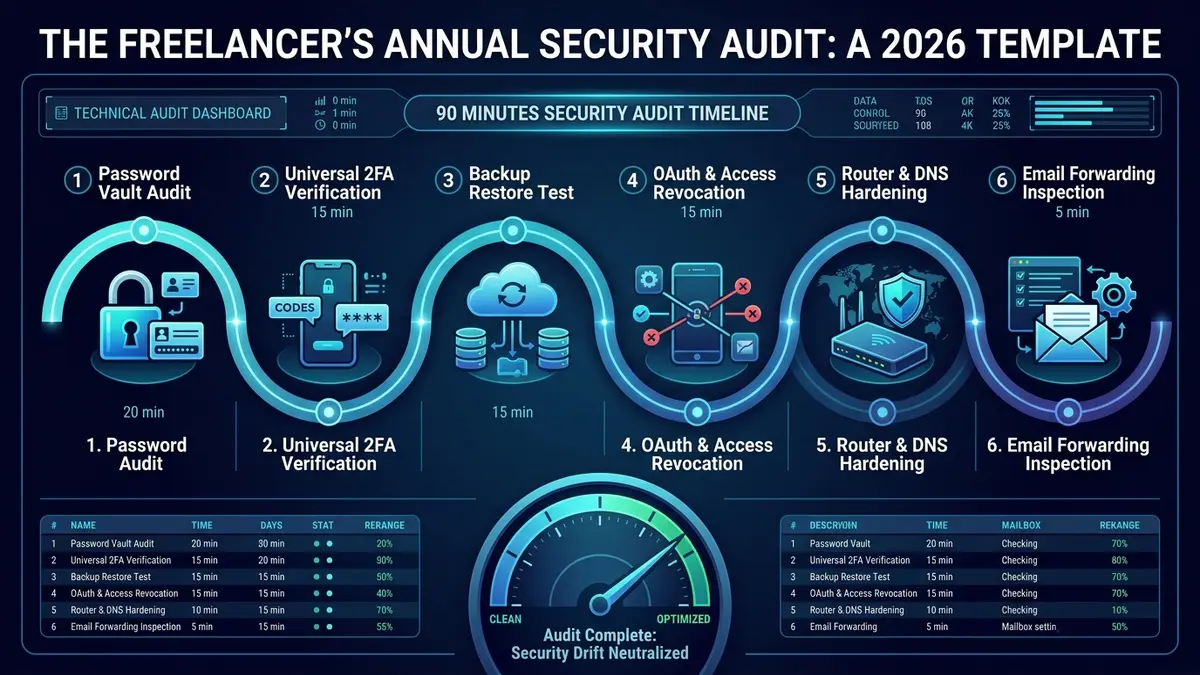
| Audit Scope | Comprehensive 90-Minute Annual Security Audit Template for Independent Professionals |
| Total Time Investment | 90 minutes once per calendar year (broken into 5 to 20-minute operational blocks) |
| Required Tooling | $0 additional spend — utilizes built-in password vault reports, cloud restore tools & OS settings |
| Primary Vulnerabilities | Silent 2FA deactivation after phone upgrades, forgotten contractor access & overprivileged OAuth |
| Standard Cadence | 1 Annual comprehensive audit + 15-minute quarterly review |
01 Key Audit Areas: The 9 Critical Vectors
Security does not fail all at once in a Hollywood-style hacking event. It erodes gradually: one skipped software update, one forgotten 2FA prompt, one temporary password that was never changed, one “I’ll deal with it later” at a time. Executing a structured annual security audit template is the critical checkpoint that catches that drift before an enterprise client asks why a former contractor still has admin access to your shared Google Drive.
According to official CISA Cyber Hygiene guidance, establishing regular administrative review cycles neutralizes the vast majority of credential and configuration drift. Here are the 9 key areas that require systematic examination:
Password Vault Health
Run built-in audits in Bitwarden or 1Password. Eliminate reused credentials and purge weak legacy passphrases.
Universal 2FA Coverage
Verify that multi-factor authentication is active on all financial, client-facing, and domain infrastructure portals.
VPN Status & Kill Switch
Confirm active subscription renewal, server handshake speeds, and verify that the desktop kill switch is operational.
Live Backup Restoration
Never assume backups work based on green checkmarks. Actively restore a test archive from Backblaze or local drives.
OS & Firmware Patching
Verify that automatic system updates for macOS/Windows, web browsers, and core security clients are active.
Orphaned Access Revocation
Revoke access for offboarded subcontractors, completed client project spaces, and dormant collaboration boards.
Domain & DNS Records
Check your domain registrar security, enforce 2FA, and verify that DNS TXT/MX records have not been tampered with.
Silent Email Forwarding
Inspect mail settings for covert forwarding rules or filters designed to intercept incoming client invoices.
OAuth App Authorizations
Review connected third-party integrations across Google Workspace, Microsoft 365, and Slack; revoke dormant apps.
02 The 90-Minute Annual Security Audit Template
Block 90 minutes on your calendar once a year, tied to an unforgettable milestone (your business incorporation date, tax season, or January 2nd). Use this structured annual security audit template to benchmark your defenses systematically:
| Audit Vector | Specific Verification Actions | Target Allocation | Status Check |
|---|---|---|---|
| 1. Password Manager | Run vault health report; replace reused passwords and weak legacy keys across all entries. | 20 min | □ Pass / Fail |
| 2. 2FA Verification | Confirm app-based or hardware key MFA is active on email, banking, domain registrar, and cloud portals. | 15 min | □ Pass / Fail |
| 3. VPN Status | Confirm subscription validity, verify IP/DNS leak protection, and test the network kill switch. | 5 min | □ Pass / Fail |
| 4. Backup Restoration | Download and restore a real client project archive from offsite backup to verify integrity. | 15 min | □ Pass / Fail |
| 5. Software Updates | Ensure automatic OS patching is functional; verify browser auto-updates and firmware versions. | 10 min | □ Pass / Fail |
| 6. Access Revocation | Audit shared Notion workspaces, Trello boards, and GitHub repos; remove past clients and contractors. | 15 min | □ Pass / Fail |
| 7. Domain & DNS | Verify registrar login security; inspect DNS records for unauthorized CNAME or MX additions. | 10 min | □ Pass / Fail |
| 8. Email Rules | Audit email settings for hidden forwarding rules or filters routing client invoices elsewhere. | 5 min | □ Pass / Fail |
| 9. OAuth Permissions | Review connected third-party apps in Google, Microsoft, and Slack accounts; revoke unused tokens. | 10 min | □ Pass / Fail |
Do not expect a flawless scorecard on your first audit. The typical freelancer identifies 3 to 5 configuration gaps. Document findings immediately and enforce a strict 30-day remediation window for secondary items while fixing critical 2FA gaps on the same day.
03 What a Security Audit Really Means for Freelancers
In enterprise environments, a security audit involves expensive third-party penetration testing and complex SOC 2 compliance reports. For solo freelancers and boutique consulting agencies, an audit serves an equally vital but far more practical purpose.
A security audit is simply a structured review of every credential, device, and access permission tied to your business, executed on a fixed schedule rather than in the chaotic aftermath of a breach. It transforms cybersecurity from passive anxiety into an orderly, repeatable business process — see our Freelancer Cybersecurity Checklist for the full framework.
Utilizing this annual security audit template ensures that your client files remain insulated from the three primary vectors that compromise remote professionals: credential stuffing, rogue OAuth integrations, and untested backup failures. Check whether any of your credentials have appeared in known breaches using Have I Been Pwned as part of your annual review.
04 What a Full IT Security Audit Covers Beyond This Template
While this 90-minute annual security audit template provides complete baseline protection for independent contractors, consultants handling sensitive enterprise data or scaling into multi-member agencies may need to extend their audit scope:
- Vendor Risk Assessment: Catalog every SaaS vendor processing client data, confirming that each provider offers SOC 2 Type II or ISO 27001 certifications.
- Contractual Data Retention Compliance: Review completed project folders against client NDAs to ensure that sensitive trade secrets are purged in accordance with contractual agreements.
- Cryptographic Key Rotation: Rotate SSH keys, API tokens, and AWS/Stripe developer secrets deployed in client environments at least once per year.
05 What This Audit Actually Catches in the Real World
The practical protection provided by executing this annual security audit template is proven in the field. Across dozens of independent professional audits, three specific vulnerabilities emerge consistently:
Forgotten Client Workspaces
A client’s Notion or Slack workspace from 18 months ago remains fully accessible. If that client suffers a leak, you remain legally exposed as an unmanaged external user.
Silently Dropped 2FA
During a smartphone upgrade, an authenticator app fails to sync. Under deadline pressure, 2FA is disabled “just for today” and remains off indefinitely.
Overprivileged OAuth Apps
A scheduling tool or productivity automation connected two years ago continues to retain permanent read/write access to your entire email inbox.
06 Frequently Asked Questions About This Audit Template
How long does a thorough annual security audit take?
Should I test my backups regularly?
What is the single most commonly neglected audit area?
What should I do if I discover a compromised account during the audit?
Do I need special tools or software to run this annual security audit template?
Why should the full audit be annual rather than monthly?
07 Verdict: Making Security a Non-Negotiable Routine
Security drift is inevitable in a thriving freelance business, but vulnerability is completely optional. Executing this annual security audit template every 12 months provides total digital clarity, protects your hard-earned reputation, and ensures you remain an enterprise-grade, trusted partner to your clients.
Audit Conclusion: SafeStackPro Verdict
Do not wait for a security breach, client data loss, or ransom demand to audit your systems. Block 90 minutes on your calendar today to execute this annual template, verify your backups, and eliminate dormant risks before they surface.
