Recognizing phishing attacks in 2026 has become the single most vital survival skill for independent professionals. A new freelancer on Fiverr recently described getting targeted within days of launching — a pattern corroborated by Fiverr’s safety documentation and cybersecurity research confirming that freelance marketplaces are now heavily targeted by turnkey phishing kits and spoofed login pages.
Find out what web trackers uncover about your canvas rendering, WebGL parameters, screen dimensions, and hardware fingerprint across every freelance portal you browse.
Scam Analyzer
“Let’s talk on Telegram / WhatsApp to save fees.”
“Your Upwork/PayPal account is suspended: click here.”
“Download project specifications from this archive link.”
Verdict: 99% Scam Probability. Scammers immediately push off-platform to strip escrow protections and deliver malicious payment links. Never move client communications off-platform during initial outreach.
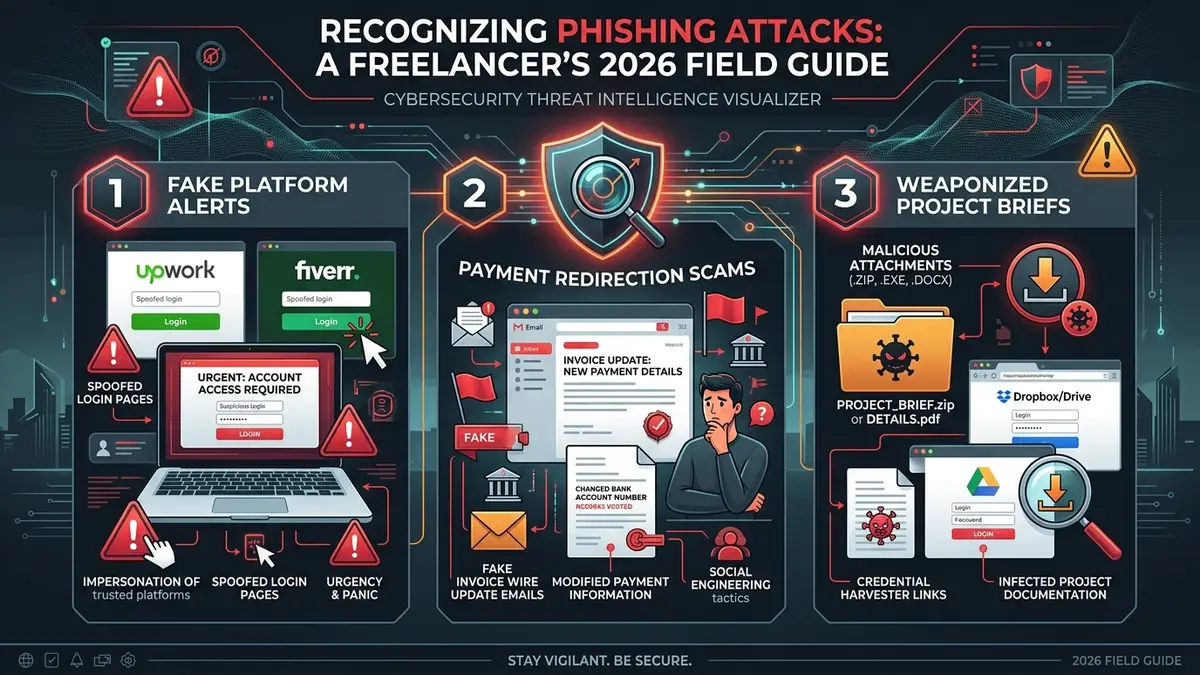
| Threat Scope | Recognizing Phishing Attacks: Defending Remote Freelancers Against Social Engineering & Fraud |
| Primary Attack Vectors | Fake platform login portals (Upwork/Fiverr spoofing), payment redirection fraud & weaponized briefs |
| Underlying Mechanism | Turnkey phishing kits with pre-built CSS clones, automated domain spoofing & session token theft |
| Core Technical Defense | Password manager domain matching (refuses autofill on fake domains) + FIDO2 / hardware 2FA keys |
| Critical 5-Min Response | Immediate password rotation, session revocation, and out-of-band client notification |
01 A New Freelancer’s First Encounter: The Excitement Trap
A candid post in the r/phishing community captures a scenario thousands of remote workers experience each month: a brand-new freelance designer on Fiverr describes getting thrilled after receiving their first client inquiries — until they noticed something unsettling about the request.
That psychological gap between professional excitement and intuitive suspicion is precisely where modern social engineering succeeds. New freelancers, eager to win five-star reviews and establish initial cash flow, are an extensively documented target for automated cybercrime rings. Mastering the fundamentals of recognizing phishing attacks ensures that your eagerness to secure contracts does not compromise your identity or client databases.
02 Why Freelance Platforms Are Prime Phishing Targets
Independent contractors often mistakenly assume hackers only target Fortune 500 enterprises. In reality, freelance marketplaces have emerged as premier hunting grounds for cybercriminals. When assessing your threat profile, recognizing phishing attacks requires acknowledging that freelance platforms are fertile ground for automated credential harvesters.
Paubox’s coverage of cybercrime on freelance platforms points to the same trend: ready-made phishing kits have made credential theft accessible even to low-skill scammers, with turnkey email templates and fake marketplace portals doing most of the work for them.
Independent security analyses reinforce this finding. Freelancermap defines phishing as a calculated social engineering attack where threat actors impersonate trusted institutions to harvest financial credentials and session cookies. Furthermore, Fiverr’s official trust & safety documentation explicitly lists phishing campaigns as a recurring threat on the platform — proving this is an active operational risk rather than an isolated anomaly.
03 Official Warning Signs & Red Flags
A foundational principle of recognizing phishing attacks is understanding the psychological manipulation attackers exploit. When evaluating suspicious client interactions, government agencies and cybersecurity specialists highlight consistent behavioral red flags:
- Manufactured Urgency: According to official Federal Trade Commission (FTC) phishing guidance, scammers routinely manufacture panic — claiming your account will be suspended within 2 hours or that a payment is locked — to bypass your critical thinking.
- Vague Project Scope with Inflated Budgets: Analysis by Skydo on freelancer scam patterns emphasizes that illegitimate clients rarely provide detailed technical briefs, instead offering above-market compensation paired with vague requests to “view the requirements file.”
- Discrepancies in Domain Names: While the display name might read “Upwork Security Desk”, inspecting the raw sender address reveals unauthenticated subdomains or typosquatted domains (such as
support@upvvork-verify.com).
Whenever an email or client message requests that you update bank account details, click a password reset link, or alter contract terms, verify the request via a completely independent channel (e.g., call the client directly on their known phone number or type the official platform URL manually into your browser).
04 Three Reusable Phishing Blueprints Targeting Freelancers
Because turnkey attack kits reuse standardized scripts, developing competence in recognizing phishing attacks comes down to identifying three recurring blueprints:
The Off-Platform Payment Pitch
A prospective client insists on moving discussions immediately to Telegram or WhatsApp, offering payment via direct wire or unverified escrow to “bypass platform commission fees.” Once off-platform, they deliver fake payment confirmation links.
The Counterfeit Security Alert
An alarming notification claiming to be from Stripe, PayPal, or Upwork warns that your payout is on hold due to missing tax documents. The email embeds a spoofed login page that captures your master credentials and MFA codes in real time.
The Weaponized Project Brief
A lucrative job offer accompanied by an encrypted ZIP or executable attachment (e.g., Project_Requirements.pdf.exe) designed to drop infostealer malware (RedLine, Lumma) that exfiltrates browser cookies and crypto wallets.
05 Emergency Protocol: First Five Minutes After You Click
Even when you excel at recognizing phishing attacks, an accidental click can happen during a moment of exhaustion or rushed deadlines. If you realize you have entered credentials or downloaded an attachment from a spoofed page, rapid execution in the first 300 seconds prevents catastrophic lateral movement:
Immediately change the password for the affected account from a separate clean device (such as your smartphone). In account security settings, click “Sign out of all other sessions” to invalidate any stolen session tokens.
If the compromised password was reused on any other platform, rotate those credentials immediately using your password manager. If the attack involved mobile credentials, review our diagnostic guide on checking if your phone is compromised.
Submit a formal phishing report directly to the platform trust team (Fiverr, Upwork, or your bank). If client deliverables or sensitive files were exposed, activate your formal incident response protocol.
06 Technical Defenses: How Password Managers Neutralize Phishing
While human vigilance is essential, technical guardrails provide an infallible safety net when fatigue impairs your judgment. The single most powerful tool for recognizing phishing attacks and preventing credential theft is a dedicated password manager:
Modern password vaults (such as Bitwarden and 1Password) rely on strict cryptographic URL matching. If an attacker crafts an exact pixel-for-pixel replica of the Upwork login screen hosted on https://upwork-login-portal.co, your password manager will detect that the domain does not match upwork.com and will refuse to autofill your credentials.
When a password manager fails to offer your saved logins on a page you thought was legitimate, treat that behavior as an immediate, definitive signal that you are encountering a phishing attempt. Combine this with our comprehensive 15-Step Freelancer Cybersecurity Checklist to insulate every layer of your business.
07 Frequently Asked Questions About Recognizing Phishing Attacks
Is phishing actually common on freelance platforms like Fiverr and Upwork?
Why are new freelancers disproportionately targeted?
What is the clearest official red flag of a phishing attempt?
How does a password manager protect against fake login pages?
08 Final Verdict: Building Instinctive Verification Habits
Phishing and social engineering on freelance platforms are persistent operational realities, but falling victim is entirely preventable. Ultimately, mastering the discipline of recognizing phishing attacks transforms digital security from a source of anxiety into a lasting competitive advantage. By recognizing manufactured urgency, insisting on on-platform communications, and relying on technical autofill safeguards, you render fraudulent attacks completely ineffective.
Defensive Conclusion: SafeStackPro Verdict
Do not rely on gut feelings alone when inspecting client requests. Enforce a strict policy of independent out-of-band verification for all payment alterations, deploy a zero-knowledge password vault, and treat every unexpected login screen with healthy professional skepticism.
