A Reddit thread asking what’s in people’s 2026 productivity stack reveals freelancers actively rethinking their workflow each year — Buffer’s own roundup of 50+ productivity tools tested narrows down to Todoist as the pick that makes sense for most working styles. In this comprehensive guide, we compare and evaluate the top productivity tools and project management software for independent professionals.
Compare relational databases, Kanban boards, client guest portals, time tracking, and team pricing tiers across the top productivity platforms.
Explore the Full Productivity Tool Comparison →Notion, Toggl Track, Wave Invoicing. Zero monthly spend.
Dedicated client portals, automated scheduling, billable hour tracking.
Shared project management software, guest seats, complex timelines.
Recommendation: Deploy the $0 Free Starter Stack (Notion + Toggl Track + Wave). Covers project documentation, time logging, and invoicing at zero financial overhead.
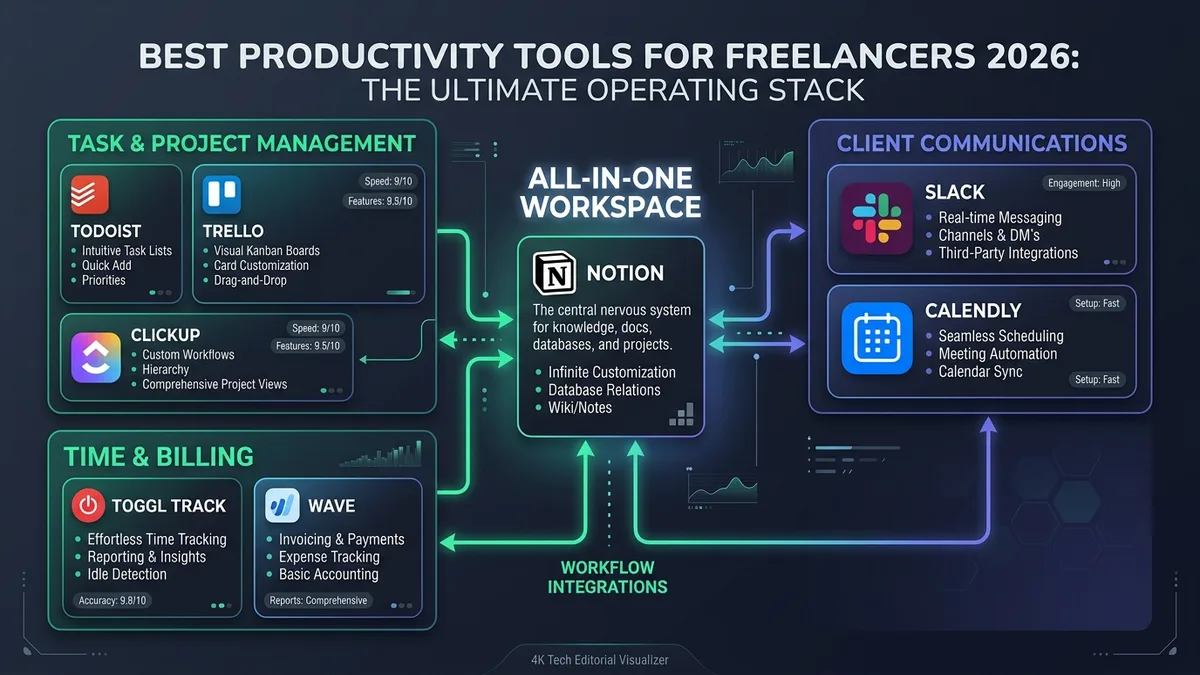
| Category | Productivity Tools & Project Management Software for Freelancers |
| Top Task Manager | Todoist (Ranked #1 by Buffer & Zapier tests for daily task execution) |
| Top All-in-One Hub | Notion (Relational wikis, project databases & client documentation portals) |
| Top Advanced PM | ClickUp (Multi-view boards, Gantt charts, native time tracking & team workflows) |
| Top Client Comms | Slack (Client channels) & Calendly (Automated calendar booking) |
| Top Free Starter Stack | Notion + Toggl Track + Wave ($0 total cost covering tasks, time & invoices) |
| Core Golden Rule | Cap active tools at 3–4; avoid switching setups unless a specific workflow is broken |
01 An Annual Stack Audit, Done Publicly
A Reddit thread in r/ProductivityApps specifically asks what’s in people’s productivity tool stack for 2026, with the poster explicitly cleaning up their workflow and trying to figure out which tools are actually worth keeping after trying many over time.
A related thread the same year asks which apps people will actually keep using — a useful reminder that annual stack audits are common practice, not just something this site recommends in isolation. For independent workers, evaluating your digital workbench annually prevents subscription bloat and clears out redundant apps before they clutter your operational rhythm.
02 What 50+ Productivity Tools Tested Narrows Down To
Finding reliable software requires filtering out marketing hype. Comprehensive third-party audits offer clear, data-backed consensus on which productivity tools deliver genuine daily utility.
Todoist comes up repeatedly in independent productivity roundups — including Buffer’s own “I’ve Tried 50+ Productivity Tools” writeup — as a go-to pick for its clean task lists and built-in time-blocking, without the overhead of a full project management platform.
Zapier independently reaches the exact same conclusion, naming Todoist its pick for the best productivity app for organizing to-do lists, specifically praising it as feature-rich while still feeling minimal, lightweight, and adaptable across desktop and mobile devices.
03 Productivity Tools Compared: Price and Best For
The table below summarizes the leading productivity tools and project management software across key freelance categories, highlighting both their free tier capabilities and starting paid plans:
| Tool | Category | Free Tier | Paid From | Best For |
|---|---|---|---|---|
| Todoist | Task management | Yes | $4 / mo | Most working styles, fast daily to-do lists & time blocking |
| Notion | All-in-one workspace | Yes | $10 / mo (AI add-on) | Solo freelancers wanting one connected tool for docs, wikis & databases |
| Trello | Kanban project boards | Yes | $5 / mo | Simple visual boards, zero learning curve for basic pipelines |
| ClickUp | Advanced project management | Yes | $7 / mo | Freelancers managing multiple clients, teams & native time tracking |
| Slack | Client communication | Yes | $7.25 / mo | Dedicated channels per client, keeping conversations out of email |
| Calendly | Meeting scheduling | Yes | $10 / mo | Removing back-and-forth booking emails with direct calendar links |
| Toggl Track | Time tracking | Yes | $9 / mo | Simple, accurate client-billable hours and exportable client reports |
| Wave | Invoicing & accounting | Yes | Free ($0) | Freelancers who want professional invoicing and bookkeeping at zero cost |
04 Notion vs Trello vs ClickUp
When choosing dedicated project management software, most freelancers inevitably weigh three primary contenders: Notion, Trello, and ClickUp. Each serves a fundamentally different operational philosophy.
Notion’s all-in-one flexibility is also its main criticism: freelancers who just want a visual task board without building a system from scratch often find it overkill. Review our detailed Notion Review 2026 to evaluate its relational database setup and mobile performance tradeoffs.
Two narrower alternatives cover that gap:
- Trello is the simplest option — a pure Kanban board with almost no learning curve, well-suited to a solo freelancer tracking one project pipeline or deliverable stage.
- ClickUp sits at the other end: more views (list, board, Gantt, calendar), native time tracking, and granular custom statuses, aimed at freelancers juggling several clients or a small team — see our full ClickUp review for the honest learning-curve breakdown.
Start with Trello if your current system is a sticky-note list or nothing at all. Move to ClickUp only once you can name a specific coordination problem Trello can’t solve. Stay with Notion if you already use it for client notes and docs and don’t want to maintain a secondary application.
05 Client Communication and Scheduling
A major gap in most freelancer productivity stacks isn’t task management — it’s the friction surrounding client communication and meeting coordination.
Slack, configured with a dedicated channel per active client or project, keeps deliverables and feedback out of cluttered email threads, making past decisions instantly searchable. Calendly removes the multi-email back-and-forth of finding a meeting time by providing clients with a self-service booking link tied directly to your live calendar availability and buffer preferences.
Neither tool is unique to freelancing, but freelancers managing multiple client accounts simultaneously feel their absence far more acutely than corporate employees with a single shared internal calendar.
06 The AI Assistant Shift
The rapid emergence of generative intelligence is actively reshaping how freelancers interact with productivity tools.
A 2026 tested roundup makes a notable claim: the best productivity app for most people is now an AI assistant you can text to manage tasks and check your calendar directly, rather than navigating a traditional standalone application interface.
A detailed personal account specifically describes Notion AI’s 2026 edition as perfect for thinking, writing, and organizing everything in one place, available as a $10/month add-on that effectively replaced their entire previous multi-tool stack.
On the writing and research side, a separate roundup of AI productivity tools for freelancers highlights Jenni AI specifically for research-backed writing with built-in citations, useful for freelancers producing client reports, technical documentation, or long-form content that requires cited claims rather than just fast initial drafts.
07 A Practical Free Starter Stack of Productivity Tools
If you are launching a freelance business on a shoestring budget, you do not need paid subscriptions to maintain a professional operating baseline. The following three zero-cost productivity tools cover the essential workflow requirements:
Notion ($0 Free)
All-in-one workspace for client notes, deliverable wikis, project databases, and lightweight task boards with generous free limits.
Toggl Track ($0 Free)
One-click background time tracking with exportable client summaries, billable hour tags, and clean timesheet reports.
Wave ($0 Free)
Professional zero-cost invoicing, automated payment reminders, and fundamental bookkeeping without monthly subscription fees.
08 The Hidden Cost of Chasing the Annual Stack Refresh
The Reddit habit of auditing your stack every year is healthy in moderation, but it has a hidden tax that productivity discussions rarely mention: every tool migration requires re-exporting data, rebuilding templates, re-establishing integrations, and enduring several weeks of friction while relearning muscle-memory keyboard shortcuts.
Todoist topping two independent evaluations does not mean you should immediately abandon a system that is already functioning smoothly. It simply means Todoist represents the safest default choice if you are starting from scratch or experiencing active frustration with your current setup.
A far more constructive diagnostic than “what is the shiny new tool this year?” is asking: “what is genuinely broken in my current workflow?” If nothing is impeding your client delivery, the switching cost almost always dwarfs the marginal feature upgrade of a new platform.
09 When to Stop Adding Productivity Tools to the Stack
The free starter stack detailed above (Notion, Toggl Track, Wave) covers three distinct, non-overlapping functions: organizing work, tracking billable time, and invoicing clients. For the majority of solo freelancers, that forms a complete operational ceiling.
The common trap after experiencing the benefits of one good tool is adding a second, then a third, chasing AI hype until you find yourself maintaining three overlapping task managers and paying recurring subscriptions for features you never use.
Before signing up for any new productivity tool, ask: Can you name the exact deliverable bottleneck your existing stack cannot solve? If the candid answer is “my stack works fine, but this tool has a nicer design,” pass on it. Freelancers who achieve the highest sustained output are those who halt tool accumulation once their core jobs are covered.
10 Project Management and Time Tracking Software for Freelancers
Among all software categories, freelancers search most frequently for reliable project management software and time tracking software.
For project management, ClickUp and Notion cover the most comprehensive territory for freelancers handling multiple clients simultaneously. While Notion excels at interconnected documentation, ClickUp provides the structured workflow hierarchy (lists, boards, sprint cycles, Gantt timelines) needed for deadline-intensive contracts. Conversely, lightweight tools like Trello suit solo professionals who require visual task boards without cumbersome configuration.
For time tracking specifically, prioritize software that activates with a single keystroke and compiles client-ready timesheets. Toggl Track and Clockify remain the two gold standards among freelancers; both offer robust free tiers and integrate seamlessly into your project management software rather than requiring manual hours logging.
11 Frequently Asked Questions About Productivity Tools
What’s the single most-recommended productivity app across independent sources?
Is an AI assistant replacing traditional productivity apps?
Should I audit my productivity tools stack regularly?
What’s a good completely free starting stack of productivity tools?
Trello or ClickUp instead of Notion?
What’s the best project management software for freelancers?
12 Verdict
Todoist leads independent testing as the single best general productivity tool for day-to-day task execution. However, for freelancers building a resilient business, the Notion + Toggl Track + Wave combination remains the most practical, zero-cost stack of productivity tools available in 2026.
Strategic Recommendation: SafeStackPro Verdict
Do not let tool management become procrastination. Start with the free starter stack to cover work organization, billable hours, and invoicing. Introduce Slack and Calendly only when client communication becomes a measurable bottleneck, and evaluate advanced project management software like ClickUp when scaling beyond solo capacity.
