Quick answer: this ClickUp review finds that the platform consolidates task management, docs, and goal tracking into one place — a Trustpilot reviewer specifically credits it with replacing Trello, Asana, Notion, and Google Docs at once. The tradeoff is real: taskrhino’s ClickUp review is candid about a 2-4 week learning curve before that power pays off. G2 and PCMag both confirm the depth of features, with PCMag flagging complexity as the honest cost of that breadth. A generous free tier makes it low-risk to test before committing.
Compare relational databases, Kanban boards, client guest portals, time tracking, and team pricing tiers across the top productivity platforms.
Explore the Full Productivity Tool Comparison →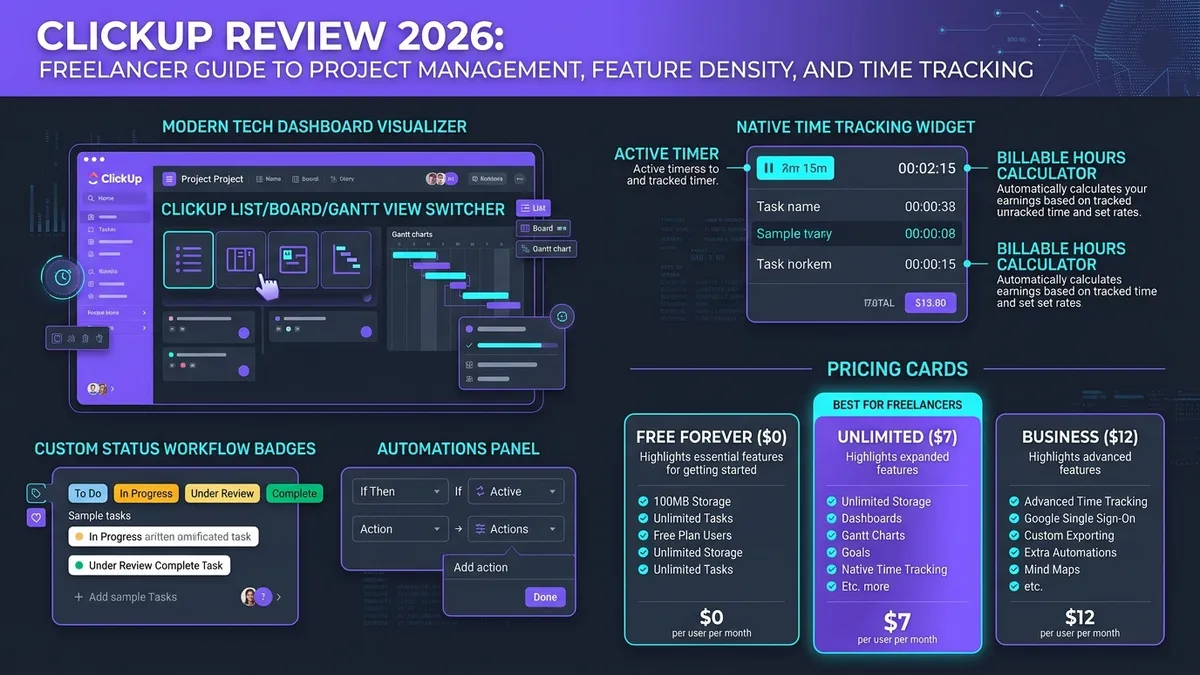
| Platform Core | ClickUp 4.0 Work Management & Collaboration Platform |
| Core Capabilities | Task Management, Native Time Tracking, ClickUp Docs, Goals, Whiteboards & Automations |
| App Consolidation | Replaces Trello (Kanban), Asana (Tasks), Toggl (Time Tracking), and Google Docs |
| Learning Curve | 2–4 weeks initial configuration required (taskrhino / Connecteam consensus) |
| Free Plan Allowance | $0 Free Forever (Unlimited tasks, 60MB storage, unlimited free plan users) |
| Paid Entry Point | $7 / user / month (Unlimited plan billed annually) — unlimited storage & dashboards |
| Independent Rating | Recommended (High feature density, excellent value per dollar, higher initial complexity) |
01 Considering a Migration
A Reddit thread in r/clickup titled directly “Is ClickUp worth it?” captures a common real scenario: a company using Notion for knowledge management and Basecamp for project management considers migrating everything to ClickUp, specifically after reading mixed signals on Reddit first. That hesitation is reasonable — consolidating tools mid-project is disruptive, and the decision usually comes down to whether the learning curve is worth the long-term simplification.
When evaluating any productivity migration, freelancers must assess switching costs against long-term gains. In this in-depth ClickUp review, we examine whether the unified dashboard, native time trackers, and relational task views justify abandoning a multi-app stack.
02 The ClickUp Review Consensus
Industry benchmarks and verified customer reviews demonstrate widespread agreement on ClickUp’s market position: in this ClickUp review, we find that users value the consolidation of multiple tools into one place.
On Trustpilot, one long-time user calls ClickUp the best all-in-one app they have used, while other reviewers complain that frequent interface changes force them to relearn the tool.
This sentiment is mirrored across software audit authorities. G2’s ClickUp review confirms it as one of the best all-in-one project management platforms built for teams managing tasks, docs, goals, and workflows together. Similarly, PCMag describes it as an attractive work management solution with a ton of features, highlighting its strength in collaborative document creation while explicitly noting that feature complexity is the inevitable tradeoff for such depth.
03 The Honest Learning Curve
The biggest hurdle in adopting ClickUp is not its pricing or technical limits — it is the onboarding investment. Any unbiased ClickUp review must address the cognitive load of its extensive hierarchy (Workspaces › Spaces › Folders › Lists › Tasks › Subtasks).
“ClickUp offers more features per dollar than any competitor, but you’ll pay for that power with a 2-4 week learning curve. It’s the ‘Android’ of project management tools — powerful, customizable, complex.”
Reinforcing this assessment, Connecteam’s review scores ClickUp 7.9/10, confirming it is a highly flexible platform with a very wide range of capabilities as the core tradeoff against lightweight simplicity. For freelancers switching from a simpler tool like Todoist or Trello, budget real setup time before expecting the consolidation to pay off. Rushing initial configuration is the single most common reason new users bounce off ClickUp during their first week.
Do not attempt to migrate your entire client database, document archive, and billing systems into ClickUp on day one. Move active weekly tasks first, test native time tracking during week two, and introduce ClickUp Docs and automations only once the core task hierarchy feels second nature.
04 Key Features: ClickUp Review Feature Analysis
ClickUp distinguishes itself from single-purpose apps by integrating several core productivity engines under one interface:
Seamlessly toggle between List, Kanban Board, Calendar, and Gantt chart views on the same underlying dataset without duplicating project entries.
Replaces standalone wikis and notes tools. Collaborative docs can be linked directly to tasks, so project context stays in one place instead of scattered across a separate wiki.
Log billable hours, record timestamps, and generate client timesheets natively without paying for third-party tools like Toggl or Harvest. Native time tracking is included from the $7 Unlimited plan; the Free plan only offers a trial.
Unlike competitors that limit free plans to 14-day trials or strict project caps, ClickUp’s free tier supports long-term solo freelance operations.
Views, Task Dependencies, ClickUp Chat and ClickUp Brain: What Each Plan Includes
Feature lists are where most ClickUp reviews get vague, so here is what ClickUp’s own pricing comparison shows as of October 2026. The core views, List view, Board view, Calendar and Table, are included on every plan, including Free. That covers most solo freelance work: a list of client deliverables with a due date on each task, and board views when you want to drag work through stages.
Task dependencies are also included on all plans. You can mark one task as waiting on another, which helps when a client deliverable can’t start until feedback comes back. Custom fields and Gantt charts are only a trial on the Free plan and become fully available on paid plans.
The planning views that matter once you work with team members or subcontractors sit higher up. Timeline view and Workload view, which shows how much work each person is carrying, are trials on the Free and entry-level paid plans and only fully included from the Business plan. Small teams that need to balance capacity across several people should budget for that tier.
ClickUp Chat puts messaging next to tasks, but on the Free plan it is limited to a trial and 90 days of message history. Paid plans remove those limits. Finally, ClickUp’s AI features, branded ClickUp Brain, are also trial-only on Free. Fuller usage depends on higher paid plans and a credit system that ClickUp has reworked during 2026, so check the current pricing page before you count on AI for client work.
05 Who Should Use ClickUp
Because ClickUp offers such broad functionality, choosing it depends on your operational tolerance for setup and customization. An important conclusion in this ClickUp review is that your workflow complexity dictates whether the platform feels empowering or cluttered:
Freelancers and small agencies currently juggling separate apps for task management, collaborative documentation, and hourly time tracking. If you are willing to invest 2–4 weeks upfront to tailor custom statuses, custom fields, and views, ClickUp saves both software subscriptions and context-switching overhead.
Solo creators who demand an intuitive out-of-the-box system with zero setup requirements. As taskrhino and Connecteam emphasize, if immediate simplicity matters more than deep flexibility, a streamlined tool like Trello, Basecamp, or Apple Reminders will feel significantly faster to deploy.
06 Pricing & Plan Breakdown
ClickUp structures its plans around scale and feature depth. For solo professionals evaluating this ClickUp review, the Free and Unlimited tiers offer exceptional market value:
| Plan | Pricing (Annual) | Core Inclusions | Best For |
|---|---|---|---|
| Free Forever | $0 | 60MB storage, unlimited tasks, unlimited members, collaborative docs, task dependencies (time tracking, custom fields and Gantt charts are trial-only) | Solo freelancers testing the platform or running basic task pipelines long-term |
| Unlimited | $7 / user / mo | Native time tracking, unlimited storage, custom fields, Gantt charts, guest permissions with view/edit controls | Freelancers and small teams needing unlimited file attachments, client views & integrations |
| Business | $12 / user / mo | Advanced time tracking (billable rates, estimates), Google SSO, custom exporting, extra automations | Growing agencies and multi-contractor teams needing sophisticated sprint reporting |
Prices above are ClickUp’s long-standing plans, billed annually (Unlimited is $10 and Business $19 when billed monthly). ClickUp is also rolling out a new AI-bundled lineup, with Core from $9 per user per month and Business from $17 per user per month billed yearly, that some workspaces see instead, so the paid plans offered to your account may differ.
Subscription pricing may adjust periodically. When conducting this ClickUp review research, we verified current promotional discounts directly on the provider’s official portal:
07 ClickUp Reviews: What Users Actually Say
Across independent user forums, Reddit discussions, and verified review platforms, ClickUp review threads reveal a consistent pattern. Users praise ClickUp for packing an extraordinary array of tools — task lists, kanban boards, docs, spreadsheets, time logs, and automations — into a single platform at a remarkably competitive price point.
However, that same versatility is the primary source of user complaints. The software can occasionally feel cluttered, with settings spread across multiple tiers of configuration menus. If you need a flexible ecosystem that eliminates 3 or 4 disparate subscriptions and are prepared to spend a few weeks configuring your ideal workspace, ClickUp reviews consistently award it top marks. Conversely, if you need an app that you can hand to an untrained client with zero onboarding friction, ClickUp’s learning curve is an obstacle worth calculating in advance.
ClickUp wins on sheer feature density and cost efficiency. Reviewers who establish disciplined naming conventions and hide unused features report massive productivity gains; reviewers who leave every feature toggle enabled often experience interface fatigue.
08 Frequently Asked Questions About This ClickUp Review
Is ClickUp actually worth the learning curve?
Can ClickUp genuinely replace multiple other tools?
Is ClickUp good for solo freelancers, or just teams?
Can I invite clients to view progress?
09 Verdict
This ClickUp review lands on a clear conclusion: it is ideal for freelancers and teams willing to invest a few weeks mastering the platform in exchange for consolidating multiple disconnected tools into one coherent hub. Real-world user feedback confirms that the consolidation delivers on its promise — provided you respect the ramp-up time.
Final Assessment: SafeStackPro ClickUp Review Verdict
ClickUp 4.0 earns a strong Top Rating for freelance project management. Its native time tracking (from the $7 Unlimited plan), customizable views, and generous free tier make it one of the most cost-efficient operational operating systems available today. If your freelance stack feels fractured across Trello, Toggl, and Google Docs, ClickUp provides the unified workspace to streamline your business.
If simplicity and immediate ease-of-use matter more than comprehensive feature depth, compare it against our curated Best Productivity Tools for Freelancers roundup before making a final commitment.
