This comprehensive freelancer cybersecurity checklist provides an actionable, 15-step operational framework for 2026. LaunchAdvisor’s cybersecurity analysis is specific and reassuring: completing just five foundational steps — starting with a password manager and multi-factor authentication — prevents an estimated 90% of breaches for independent creators and remote professionals.
Find out what web trackers uncover about your canvas rendering, WebGL parameters, screen dimensions, and hardware fingerprint across every freelance portal you browse.
Defense Advisor
Reused passwords, no 2FA on email, unencrypted hard drives.
Vault installed, basic 2FA, but no automated backup or public Wi-Fi VPN.
Air-gapped 3-2-1 backups, zero-log VPN, isolated client profiles.
Immediate Action: High vulnerability. Complete Step 1 (Password Manager), Step 2 (MFA on Email/Banking), and Step 6 (Unique Passwords) this afternoon to eliminate 90% of opportunistic attack vectors.
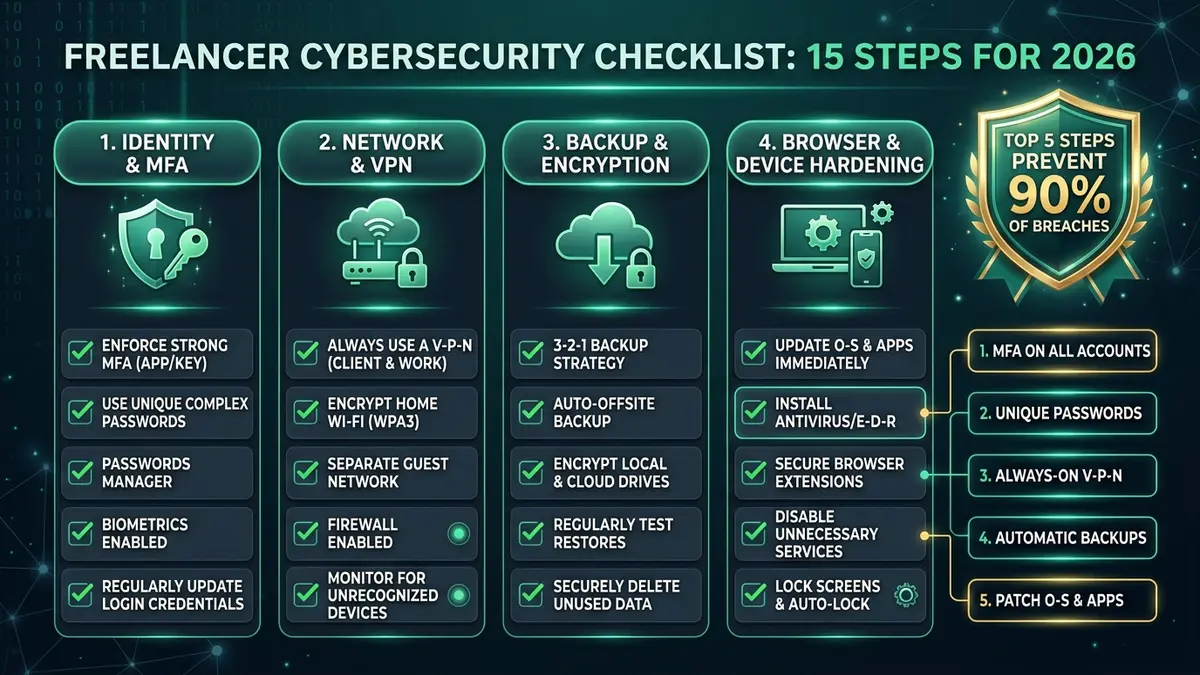
| Checklist Scope | 15-Step Defensive Security Framework for Freelancers & Solopreneurs (2026) |
| Core 90% Protection | Password Manager + Universal MFA + Unique Keys + Automated Backup + OS Patching |
| Network Layer | Audited No-Log VPN + Kill Switch Active + WPA3 Encrypted Wi-Fi |
| Storage & Backup | 3-2-1 Automated Encrypted Offsite Cloud Backup + FileVault / BitLocker At-Rest |
| Browser & Client Layer | Monthly Extension Audits + Isolated Client Profiles + HTTPS-Only Enforcement |
| Execution Window | 60–90 minutes initial setup; 15-minute quarterly audit review |
01 The Five Steps That Matter Most
When independent contractors review cybersecurity advice, they are frequently overwhelmed by complex enterprise protocols. However, verified data on this freelancer cybersecurity checklist reveals that digital security follows an extreme Pareto principle.
“Cybersecurity analysis confirms that just five steps prevent 90% of breaches for freelancers and small business owners: deploying a password manager, generating unique passwords, enforcing two-factor authentication, scheduling automated backups, and applying OS updates.”
— Small Business Advisory, LaunchAdvisor Cybersecurity Checklist for Freelancers
Expanding on this foundation, SolidGigs’ checklist for high-earning freelancers specifically recommends enabling MFA on all work-related platforms — including email inboxes, cloud databases, project management tools, and domain registrars — rather than restricting multi-factor protection solely to online banking.
02 Community Insights: Real-World Freelancer Rules
A popular discussion thread in r/cybersecurity_help titled “A security checklist to keep you safe” provides blunt, battle-tested advice that every independent professional should internalize:
- Never pirate commercial software: Cracked productivity apps and torrented plugins represent the number-one delivery vector for infostealer trojans targeting freelance workstations.
- Enforce hardware or app-based MFA everywhere: Reject SMS verification whenever authenticator apps (Aegis, Raivo) or hardware security keys (YubiKey) are available.
- Practice extreme data stinginess: Never disclose personal phone numbers or primary email addresses on public client portals or freelance marketplace bios.
- Never run untrusted attachments: Treat every unsolicited PDF, compressed ZIP, or executable sent via client messaging apps with active skepticism until verified.
03 The Full 15-Step Freelancer Cybersecurity Checklist
Work through this actionable freelancer cybersecurity checklist systematically. Completing these 15 steps establishes an enterprise-grade defense posture without requiring IT expertise:
Activate app-based 2FA (Aegis, Raivo, or Bitwarden Authenticator) across your email, financial portals, domain registrars, and cloud vaults. See our complete 2FA Setup Guide.
Encrypt all inbound and outbound traffic through an independently audited provider like NordVPN or Surfshark when working outside your home network.
Maintain continuous, versioned cloud backups with Backblaze to ensure immediate ransomware recovery (see our hands-on Backblaze review). Read our Google Drive vs Dropbox vs OneDrive comparison for sync alternatives.
Enable automatic system updates on macOS or Windows. Patching known zero-day vulnerabilities closes the entry doors exploited by automated exploits.
Eliminate password reuse entirely. Generate 16+ character random passwords for every client dashboard and platform login.
Never update wire transfer or invoice payment coordinates based solely on an email request. Call your client directly on a known phone number.
Configure your VPN client to instantly cut all internet connectivity if the encrypted tunnel drops, preventing IP and DNS leakage.
Encrypt your workstation’s internal SSD so that client deliverables and cached credentials remain unreadable if your laptop is stolen.
Uninstall browser add-ons you haven’t actively used in 30 days. Malicious or compromised extensions have full visibility into every keystroke and web tab.
Change your router’s factory default admin login, update its firmware, and isolate smart IoT devices onto a segregated guest network.
Coffee shop and airport networks allow packet sniffing and rogue hotspot spoofing. Keep your VPN engaged before opening any browser window.
Never input proprietary client code or NDA-protected documents into public AI models that use inputs for model training. Review our AI Disclosure Guide.
Establish a documented action plan covering session revocation, password rotation, and client notification if an account anomaly is detected.
Schedule a recurring annual security review to purge orphaned accounts, check backup restore integrity, and retire obsolete subscriptions.
04 Browser Security: The Overlooked Attack Surface
Most remote workers spend 70% to 80% of their workday inside a web browser — yet browser security is notoriously absent from a typical freelancer cybersecurity checklist. Implementing these three measures delivers an immense return on security:
- Audit Extensions Monthly: Browser extensions possess sweeping permissions to inspect, modify, and transmit DOM data. Purge any extension not strictly needed for client deliverables, and only retain tools from verified developers.
- Enable HTTPS-Only Mode: Enforce end-to-end encrypted TLS across all web browsing. Activate this in Chrome (Settings › Privacy & Security › Always use secure connections), Firefox, or Safari to prevent SSL stripping on rogue networks.
- Isolate Client Sessions with Dedicated Browser Profiles: Separate client logins, session tokens, and cookie caches by establishing distinct browser profiles. This prevents session hijacking from spilling into sensitive client portals.
Extensions and cookies are only part of your digital trail. Run our comprehensive Free Browser Fingerprint Test to analyze what your canvas rendering, WebGL headers, and audio context reveal to external trackers.
05 Recognising Phishing: Patterns That Target Freelancers Specifically
Cybercriminals deliberately target freelancers because independent operators lack internal IT departments to intercept social engineering lures. The most dangerous attacks in 2026 follow three distinct formulas:
Payment Redirection Scams
Spoofed client emails requesting urgent changes to bank account routing numbers prior to invoice payout. Always confirm banking changes via phone.
Fake Marketplace Suspensions
Counterfeit notices from Upwork, Stripe, or PayPal warning of imminent account termination. Check the actual sender domain — never the display name.
Shared Document Traps
Fake Google Docs or Microsoft 365 links requiring login credentials to view project briefs. Open your cloud storage directly in a fresh tab instead.
06 Device Encryption: Protect Data At Rest
If your laptop is lost in transit or stolen from a coworking desk, step 9 in our freelancer cybersecurity checklist — full-disk encryption — serves as your final impenetrable barrier protecting confidential client deliverables:
- macOS (FileVault 2): Encrypts your drive using hardware-accelerated XTS-AES-128. Enable it under System Settings › Privacy & Security › FileVault. Store your recovery key inside your password manager vault — never in iCloud.
- Windows (BitLocker): Provides AES-128 or AES-256 encryption. Available natively in Windows 10/11 Pro (search “Manage BitLocker”). Windows Home users can activate native Device Encryption or deploy open-source VeraCrypt.
- External Backup Drives: Always encrypt portable SSDs and USB drives used for client archival using VeraCrypt or APFS Encrypted containers to prevent physical data exposure.
07 Antivirus: Do Freelancers Still Need It in 2026?
The necessity of third-party antivirus software has evolved dramatically as native operating system protections have matured:
For macOS Users: Apple’s integrated security stack (XProtect, Gatekeeper, and system integrity protection) automatically neutralizes known malware families. Bulky third-party suites frequently create system instability and battery drain. Malwarebytes Free serves as an ideal on-demand scanner without real-time overhead.
For Windows Users: Built-in Microsoft Defender consistently scores 99% to 100% in independent AV-TEST evaluations, matching costly commercial antivirus tools. Ensure real-time cloud protection is enabled, and supplement with Malwarebytes Free for occasional second-opinion scans. Paying for third-party commercial antivirus is unnecessary compared to executing the 15 steps in this freelancer cybersecurity checklist.
For Mobile & iOS Devices: While mobile operating systems prevent traditional antivirus scanners through strict application sandboxing, smartphones face distinct threats including rogue MDM configuration profiles, malicious calendar subscriptions, and compromised cloud accounts. If you notice persistent battery drain or unfamiliar profile prompts on your handheld device, use our dedicated guide on how to know if your iPhone is hacked to run a complete iOS integrity audit.
08 Turning This Into a Repeatable Cyber Security Checklist
A security checklist is only effective if it becomes an established operational habit. To ensure long-term defense integrity:
- Quarterly Review (30 Minutes): Re-verify the top 5 high-impact items: master password rotation, 2FA status, cloud backup health, browser extension purge, and router firmware updates.
- Annual Stack Audit: Once a year, work through all 15 steps of this freelancer cybersecurity checklist end-to-end. Use our Annual Security Audit Template to document compliance for enterprise clients.
09 Frequently Asked Questions
Which steps actually matter most if I’m starting from zero?
Should I enable MFA on every single platform?
How long does completing this freelancer cybersecurity checklist take?
Should I revisit this freelancer cybersecurity checklist regularly?
10 Final Verdict & Defense Action Plan
If your schedule is constrained, prioritize the top five core steps today: a password manager, unique credentials, and universal MFA cover the highest-leverage 90% of your exposure. Executing the remaining 10 steps of this freelancer cybersecurity checklist ensures full operational resilience across networks, backups, and physical hardware.
Operational Assessment: SafeStackPro Verdict
Security is not an all-or-nothing proposition — every step implemented measurably reduces your risk profile. Pair this checklist with our complete security stack guide to build an impenetrable freelance workflow for under $15 per month.
