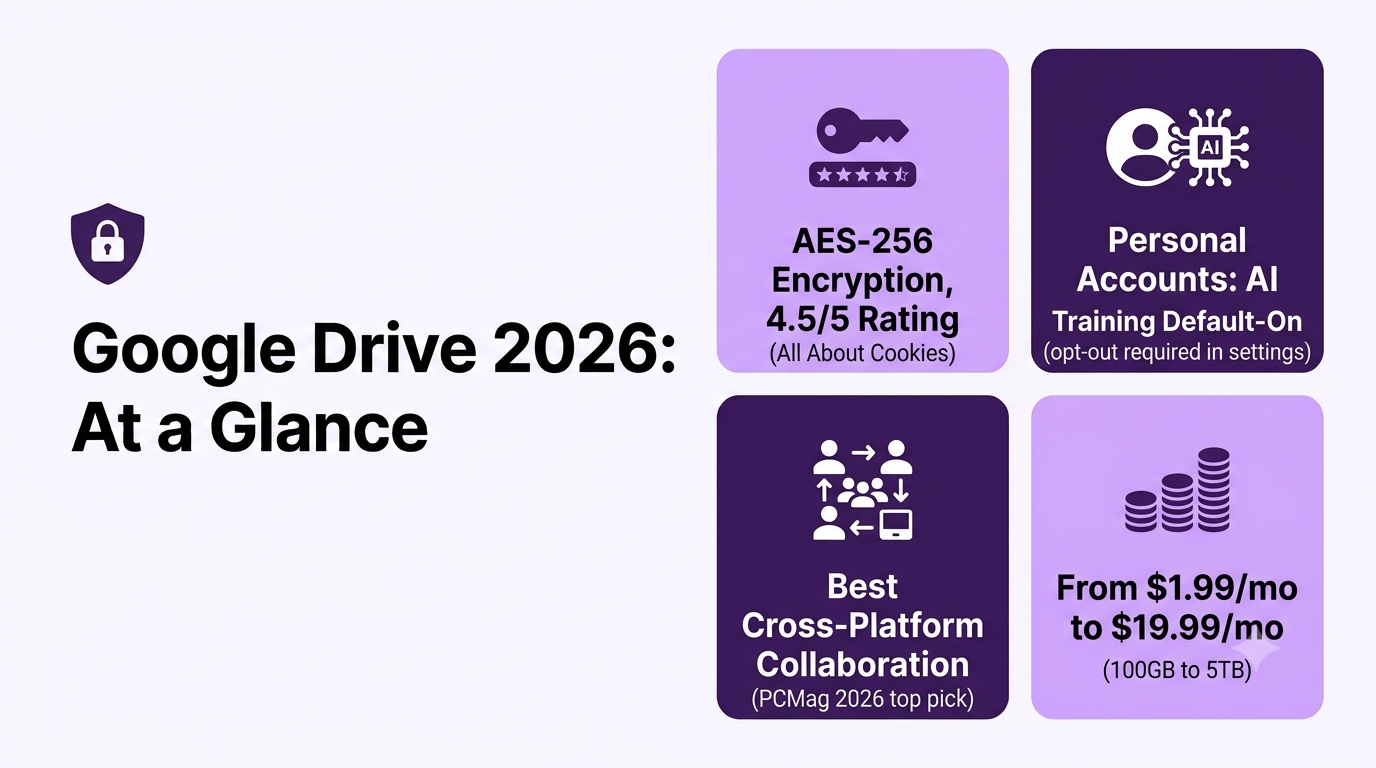
This Google Drive review confirms it remains the safest default for cross-platform compatibility and client collaboration, backed by AES-256 encryption and a 4.5/5 security rating from All About Cookies. The catches: it’s internet-dependent, account-suspension recovery can be slow, and personal (non-Workspace) accounts now default into AI training on uploaded media unless you opt out.
Filter backup providers by cold-storage tier, per-TB pricing, private encryption keys (Zero-Knowledge), and versioning retention to find the most secure cloud for your client archives.
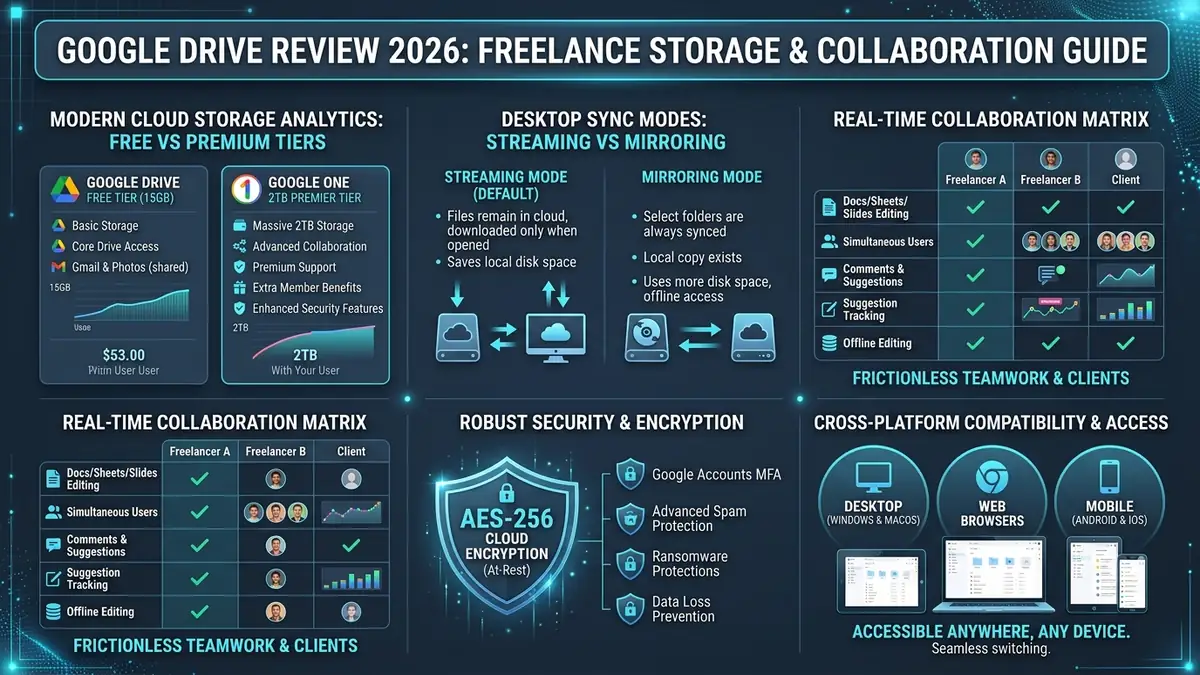
| Free Storage | 15 GB Free: Shared across Google Drive, Gmail, and Google Photos. |
| Pricing Tiers | $1.99/mo (100 GB) to $9.99/mo (2 TB) with family sharing and Gemini AI options. |
| Collaboration | Industry Gold Standard: Instant real-time multi-user editing with granular permissions. |
| Zero-Knowledge E2EE | No default E2EE: Server-side AES-256 only; requires Workspace CSE or Cryptomator for sensitive files. |
1 Is Google Drive Still the Best Cross-Platform Cloud Storage for Freelancers?
A Reddit thread in r/cloudstorage asks directly: is Google Drive good for me? The specific scenario involves wanting cloud storage to function like a D: drive accessible seamlessly across Windows and other devices — a genuinely common use case worth weighing against the alternatives.
- Frictionless Client Handoffs: Virtually 100% of freelance clients already have a Google account; no software downloads or onboarding friction required.
- Generous 15 GB Free Space: 7.5x more free cloud storage than Dropbox (2 GB) and 3x more than OneDrive (5 GB) right out of the gate.
- Streaming vs Mirroring: Virtual drive streaming keeps gigabytes of client media off your local SSD while remaining accessible on demand.
- Zero-Knowledge Trade-off: Google holds encryption keys by default; regulated client data (medical, financial, high-NDA) requires Workspace CSE or third-party tools like Cryptomator.
2 What Is the Independent Reviewer Consensus on Google Drive?
This Google Drive review pulls its consensus from four independent sources rather than Google’s own marketing pages. PCMag’s 2026 review credits Google Drive with powerful file storage and syncing, standout collaboration tools, polished mobile apps, and increasingly useful AI features. Experte.com specifically praises its intuitive interface, flexible storage options, and seamless Google integration, calling it ideal for cloud collaboration. Capterra’s 2026 review notes reviewers appreciate the generous free space, easy folder organization, reliable backups, and strong privacy.
PCMag has repeatedly named Google Drive an Editors’ Choice pick for cloud file storage and syncing, largely on the strength of its real-time collaboration tools and generous free tier. It’s worth noting that Google Drive’s own encryption doesn’t include zero-knowledge, client-side encryption by default — if that matters for your work, pair it with a dedicated encryption tool or look at a provider that offers it itself, such as pCloud with its Encryption add-on (see our pCloud vs Google Drive comparison).
3 How Powerful Are Google Drive’s Search and OCR Capabilities for Client Files?
One practical strength reviewers rarely call out by name: Google Drive’s search runs OCR (optical character recognition) on scanned documents and images automatically, so a photographed receipt, a scanned signed contract, or a screenshot of an invoice becomes searchable by its actual text content, not just its filename. For freelancers who accumulate years of client contracts and receipts as scans or photos, this alone can save the time other reviews spend praising less concrete “AI-powered search” claims — right-click any scanned file, open it with Google Docs, and the OCR text extraction runs automatically.
4 How Robust Is Google Drive’s Security, Encryption, and Privacy Architecture?
All About Cookies rates it 4.5/5, concluding Google Drive is secure for most users, with strong AES-256 encryption and robust account protection features like 2FA. Google’s own Safety Center documents the account-protection layers (2FA, contextual login verification) referenced throughout this Google Drive review.
On the privacy question freelancers actually care about — does Google read or train AI on your client files — Google’s own Workspace documentation states it does not use Workspace content for ad targeting, and does not use Workspace data to train the Gemini models that power Search and other products outside Workspace, without explicit permission. That commitment is specific to Workspace accounts.
It gets murkier on personal Google accounts: as TechCrunch reported in July 2026, Google broadened a personal-account privacy setting that allows uploaded files, images, and recordings to train its AI models unless you manually opt out. Separately, TechRadar reported on Gemini scanning Drive files without clear user permission, though Google disputed the framing, stating Gemini in Workspace requires users to proactively enable it before any content is used. If you’re storing client work on a personal Google account rather than Workspace, check your AI-training opt-out setting directly — don’t assume the Workspace privacy commitments apply to you.
Google encrypts stored data with AES-256 at rest and TLS in transit, and its infrastructure is SOC 2/3 and ISO 27001 compliant — solid baseline security. The catch: Google holds the decryption keys server-side by default, so if you’re handling regulated client data, you’ll want a Workspace plan with Client-Side Encryption (CSE) enabled rather than relying on the default setup.
5 How Did We Evaluate Google Drive for Real-World Freelance Workflows?
This Google Drive review combines independent testing from PCMag, Experte.com, Capterra, and All About Cookies with real user threads from Reddit and Trustpilot, plus Google’s own support documentation and recent reporting on its 2026 privacy policy changes — rather than relying on Google’s marketing pages alone.
6 What Are Google Drive’s Critical Limitations Freelancers Must Know?
A detailed pros-and-cons breakdown notes that while upload and download speeds are decent as a standalone service, everything is tightly connected to the internet — a meaningful consideration for freelancers who need reliable offline access during travel or unreliable connectivity.
There’s a sharper risk specific to freelancers who travel: Google account suspensions triggered by “unusual activity” flags, including simply logging in from a different country. A documented 2026 case involved a Google Workspace account flagged as “hijacked” and locked purely because the owner was accessing it from overseas — despite repeated confirmation it was the legitimate owner.
Google’s support process for these cases is slow and largely automated, with no guaranteed path to a human. If you keep client deliverables only on Google Drive and travel for work, keep a periodic local or secondary-cloud backup (Google Takeout works for full exports) so a login flag can’t cut off access to files you need for a deadline.
Reviewers on Trustpilot and Capterra echo the same theme even outside travel scenarios: the most common complaint isn’t the storage or sync itself, but slow, script-driven customer support when something does go wrong, and shared storage across Gmail, Photos, and Drive filling up faster than expected.
- Separate Personal & Client Work: Use a dedicated Google Workspace account with your custom domain to prevent accidental automated personal bans from locking client assets.
- Follow the 3-2-1 Rule: Never treat Google Drive as your sole backup. Maintain an automated local external hard drive backup and an independent cloud backup (e.g., Backblaze).
- Pre-Sync for Offline Travel: Mark essential client folders as “Available Offline” before boarding flights or traveling to low-connectivity areas.
- Opt-Out of AI Training: In personal accounts, review your Google account privacy settings to ensure client media is not indexed for AI model enhancements.
7 What Are Google One & Google Workspace Pricing Plans in 2026?
Google One’s 2026 lineup folds Gemini AI access directly into the storage tiers: Basic (100GB) runs $1.99/month, Google AI Plus (200GB) is $7.99/month, and Google AI Pro (5TB, up from 2TB in prior years) is $19.99/month. Google AI Ultra now comes in two tiers: $99.99/month for 20TB, or $199.99/month for 30TB plus Gemini 3 Pro and Cloud credits — overkill for nearly all freelancers, though Google did cut the top tier’s price from its earlier $250/month. For business use, Google Workspace starts at $7/user/month (Business Starter), scaling to $14 (Standard) and $22 (Plus) per user on an annual plan — and Workspace is the tier that carries the stronger no-AI-training privacy commitment described above, which matters if you’re storing client files.
Six tiers, three of them tacked on Gemini access nobody asked for — here’s what you actually get at each price point:
| Plan | Storage | Price |
|---|---|---|
| Basic | 100GB | $1.99/mo |
| Google AI Plus | 200GB | $7.99/mo |
| Google AI Pro | 5TB | $19.99/mo |
| Google AI Ultra | 20TB | $99.99/mo |
| Google AI Ultra (top) | 30TB + Gemini 3 Pro | $199.99/mo |
| Workspace Business Starter | 30GB/user | $7/user/mo |
| Workspace Standard | 2TB/user | $14/user/mo |
| Workspace Plus | 5TB/user | $22/user/mo |
| Cloud Storage Provider | Free Storage | Paid Entry Tier | Zero-Knowledge E2EE | Best Feature for Freelancers |
|---|---|---|---|---|
| Google Drive (Google One) | 15 GB | $1.99/mo (100 GB) | No (Server AES-256) | Universal client adoption & Docs collaboration |
| Dropbox | 2 GB | $9.99/mo (2 TB) | Add-on Only | Block-level sync & large video workflows |
| Microsoft OneDrive | 5 GB | $1.99/mo (100 GB) | Personal Vault only | Native Windows 11 & Office 365 bundling |
| Proton Drive | 5 GB | $3.99/mo (200 GB) | Yes (100% Native E2EE) | Strict Swiss privacy & zero-access architecture |
8 How Secure Is Google Drive, Really? (Technical Deep Dive)
How secure is Google Drive for freelancers handling client files? Google Drive encrypts files in transit and at rest on its servers, backed by SOC 2/3 and ISO 27001 certifications — solid baseline security. What it does not offer is zero-knowledge, end-to-end encryption by default: Google itself can technically access file content, unlike a provider such as Proton Drive. For most freelance work this baseline is adequate; for files under strict NDA or containing regulated client data, pair Drive with a client-side encryption tool for anything genuinely sensitive rather than relying on Drive’s default encryption alone.
9 Frequently Asked Questions About Google Drive (2026)
Is Google Drive actually secure enough for client files?
Yes. All About Cookies confirms strong AES-256 encryption for files at rest and in transit, plus robust account protection including 2FA, rating it 4.5/5 overall. There’s an important caveat worth knowing, though: that same review points out Google Drive isn’t end-to-end encrypted, meaning Google itself holds the encryption keys and could, in theory, access your files if compelled to. For most freelancers storing routine client deliverables, that’s an acceptable tradeoff given the account-security layer — 2FA plus Google’s contextual login verification, which flags unfamiliar devices or locations. If you’re handling genuinely sensitive material like legal documents, financial records, or health data, a zero-knowledge alternative gives you a structural guarantee Drive can’t.
Does Google Drive work well offline?
This is a genuine limitation. Reviewers rate its upload and download speeds as solid for a standalone service, but Drive still needs an internet connection to work — it doesn’t have the robust offline modes some competitors offer. Google Drive does support offline access for specific files you mark in advance through the desktop app or browser extension, so it isn’t entirely internet-dependent — but that has to be set up ahead of time rather than working automatically the way some rivals handle it. For freelancers who travel to areas with unreliable connectivity, or who work on flights and trains regularly, mark your active project files for offline access before you lose signal, not after.
What do reviewers praise most consistently in this Google Drive review?
Generous free storage, easy organization, and seamless Google ecosystem integration appear repeatedly across independent reviews. PCMag’s 2026 review singles out its file storage, syncing, and mobile apps as particular strengths. Experte.com separately praises its intuitive interface and flexible storage options, calling it ideal for cloud collaboration, while Capterra’s reviewers highlight the generous free space, reliable backups, and strong privacy controls. The consistent thread across all three reviews: Drive’s biggest strength isn’t any single standout feature, it’s how seamlessly it integrates with the tools freelancers already use daily, from Gmail attachments to real-time Google Docs collaboration with clients.
Can I share folders with view-only client access?
Yes. Granular sharing permissions make it easy to control exactly what each client can see or edit — you can set individual files or folders to view-only, comment-only, or full edit access, and revoke that access at any time without affecting your own copy. This matters for freelancers juggling multiple clients: you can share a single deliverables folder with view-only access for a client while keeping your working files and drafts private in a separate folder they never see. Link-based sharing also lets you set expiration dates on access, useful for time-limited project handoffs where you don’t want to remember to manually revoke permissions later.
Does Google use my files for ads or to train its AI?
Not on Workspace accounts. Per Google’s own documentation, it doesn’t use Workspace content for ad targeting, and it doesn’t train the Gemini models that power Search and other products outside Workspace without explicit permission. Personal Google accounts are a different story. As TechCrunch reported in July 2026, Google broadened a personal-account privacy setting so that media you upload through Search-adjacent services, Lens photos, Search Live voice recordings, and similar uploads, now trains its AI models by default unless you opt out manually. Separately, TechRadar reported a case of Gemini in Drive generating an AI summary of a private document without the user proactively requesting it, though Google disputed the framing. The practical takeaway: if you’re not on Workspace, go check that opt-out setting yourself instead of assuming Google’s Workspace promises cover you too.
How secure is Google Drive, really?
Google Drive encrypts data in transit and at rest, holds SOC 2/3 and ISO 27001 certifications, and hasn’t had a major breach exposing user file contents. Where it’s weaker than a zero-knowledge tool is that Google itself technically can access file contents (for abuse scanning, AI features, and legal requests) — encryption protects you from outside attackers, not from Google. For client-sensitive files, pair it with client-side encryption or a stricter platform rather than relying on Drive’s defaults alone.
10 Final Verdict: Should You Choose Google Drive for Your Freelance Stack?
SafeStackPro Editorial Verdict: Recommended
This Google Drive review concludes it remains the safest default choice for freelancers prioritizing maximum client compatibility and ecosystem integration — just plan around its internet-dependent design if you travel often, keep an independent backup in case of an account flag, and use a Workspace account rather than a personal one if you want Google’s strongest data-training commitments applied to client files.
Get Google Drive →
