This complete guide to AI tools for freelancers starts with the quick answer: no single AI tool covers everything well. ChatGPT Plus remains the broadest all-in-one option; Claude is the stronger pick specifically for coding and nuanced, natural-sounding writing. Most freelancers end up using AI as a fast first draft that gets edited, not a finished deliverable — treating it otherwise is where quality and client trust both slip.
Evaluate leading AI models for commercial confidentiality, token pricing, reasoning speed, and direct integration with your freelance productivity workflow.
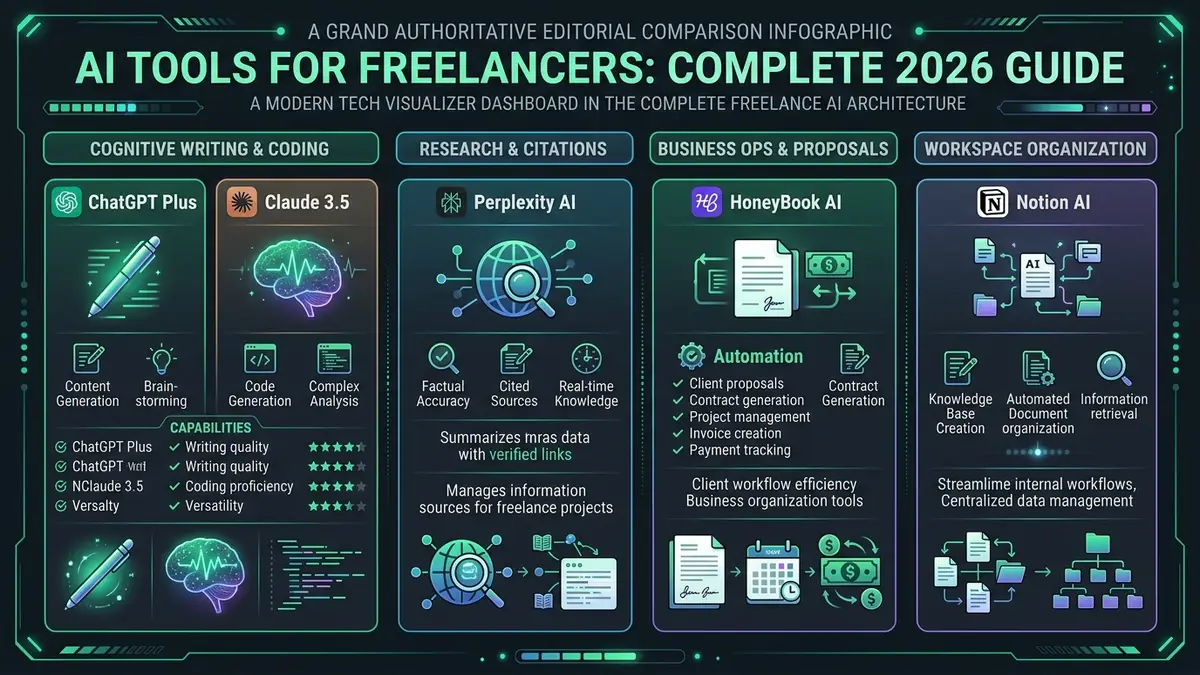
| Flagship Cognitive Engines | ChatGPT Plus (GPT-6 Astra, $20/mo) & Claude Sonnet 5 | Core Edge | General writing, complex logic, and split-screen Canvas editing |
| Research & Grounding | Perplexity AI ($20/mo) | Core Edge | Real-time verified source citations and academic footnote audit |
| Client Ops & Billing | HoneyBook AI ($19/mo) | Core Edge | Automates proposals, contracts, client onboarding & invoicing |
| Central Workspace Hub | Notion AI (Business $20/mo) | Core Edge | Instant Q&A retrieval across connected client databases & wikis |
01Why AI Tools for Freelancers Matter Now
Unlike an in-house employee with a dedicated research assistant or copyeditor down the hall, freelancers wear every hat: strategist, researcher, writer, editor, billing administrator, and tech support. AI tools don’t change the core skill a client hires you for, but they compress the time spent on every task around it.
In 2026, the gap between freelancers who use AI effectively and those who don’t isn’t about generating more content — it’s about margin. A freelancer who drafts proposals in 15 minutes instead of 90, summarizes client call transcripts automatically, and catches code errors before the client sees them can take on more billable work without working more hours.
02Categories of AI Tools for Freelancers
“Best AI tools” lists often blend unrelated categories together. Here’s how the landscape actually divides for freelance work:
- General writing and reasoning assistants: ChatGPT Plus (GPT-6 Astra), Claude Sonnet 5. Broad capabilities across drafting, summarizing, brainstorming, and editing. These are the daily drivers. Before pasting client files into Claude, check whether Claude is safe for client work. If Meta AI is the assistant already in your WhatsApp or Instagram, read whether Meta AI is safe for client work.
- Specialized writing and editing: Grammarly, Jasper, Copy.ai. Focused on tone, brand voice, and marketing copy at scale. Before pasting client text into Grammarly, read is Grammarly safe for client work.
- Research and knowledge retrieval: Perplexity AI. Designed for sourced research with direct citations rather than purely conversational answers.
- Coding assistants: GitHub Copilot, Cursor, ChatGPT/Claude with code mode. Essential for technical freelancers and developers.
- Business and administrative automation: HoneyBook AI, Notion AI, ClickUp Brain. Automating proposals, contracts, invoices, and client project management (see our ClickUp review).
- Audio and meeting intelligence: Otter.ai, Fireflies.ai. Recording, transcribing, and extracting action items from client calls. Before a bot records your clients, read is Fireflies AI safe for client calls.
- The 80/20 Foundation: 80% of your freelance AI value comes from one primary conversational model (ChatGPT Plus or Claude). Master prompt engineering and context retention before adding niche software.
- Administrative Debt: Non-billable admin (proposals, contracts, invoices) eats up 25% of an average freelancer’s week. Tools like HoneyBook AI deliver higher financial ROI than a third copywriting app.
- Strict Privacy Hygiene: Never feed unredacted client financial records, intellectual property, or proprietary API keys into consumer-grade AI models without verifying data training exemptions.
03How We Evaluate AI Tools for Freelancers
Our evaluation focuses on three things that matter for daily freelance use: output quality on real client deliverables (not benchmark tests), practical workflow speed, and whether the tool replaces a billable hour or just adds another subscription to manage. We compare each tool on common freelance workflows: writing proposals, summarizing source documents, drafting client deliverables, and debugging code, using vendor documentation and published independent reviews.
04AI Tools for Freelancers at a Glance
| Tool | Strongest At | Best For | Monthly Cost |
|---|---|---|---|
| ChatGPT Plus | Breadth — writing, research, data analysis, image generation, Canvas split-screen editor | General freelance multi-tasking | $20 / mo |
| Claude Pro | Nuanced writing, large document context, clean coding output | Writers, developers, long-form consultants | $20 / mo |
| Perplexity AI | Source-grounded research with direct web citations | Fact-checking, academic & market research | Free / $20 mo |
| Notion AI | Workspace-connected search, meeting action items, database autofill | Freelancers organizing all client docs in Notion | $20 / user / mo |
| HoneyBook AI | Automated client onboarding, contracts, proposals, invoices | Service businesses, creative agencies, consultants | From $19 / mo |
05Choosing AI Tools for Freelancers
Match the tool to the task, not the other way around. Running every task through one tool because it’s familiar is the most common inefficiency in freelance AI use. Use Claude when the client deliverable requires nuanced, natural-sounding prose that doesn’t read like AI output. Use ChatGPT Plus when you need multimodal inputs, live data analysis of client spreadsheets, or rapid Canvas iterations.
Start with the free tiers to find your workflow fit. Every major AI tool offers a free tier or trial. Run the same real client task through two competing tools before committing to a paid subscription. The differences in output quality and interface friction become obvious within three prompts.
Upwork’s 2026 Future Workforce Index found that a majority of freelancers now use AI tools in their day-to-day work, and that most started freelancing by choice rather than necessity — a sign that AI adoption is becoming table stakes rather than a competitive edge on its own.
06AI Tools for Freelancers: Client Disclosure
Whether you’re required to disclose AI use to clients depends on your contract and, increasingly, platform terms. If a client contract specifies “all work must be original, human-authored content,” using AI without explicit written consent is a breach of contract — even if you heavily edited the output. When contracts are silent, the ethical standard is clear: disclose AI use for any client-facing deliverable where the client would reasonably assume human authorship.
A simple, professional disclosure in your project proposal handles this cleanly: “I use AI-assisted research and drafting tools to accelerate delivery, with all final deliverables reviewed, fact-checked, and refined personally.” Most clients care about accuracy, timeline, and confidentiality, not whether you used software to draft faster.
07AI Tools for Freelancers: Data Privacy Risks
This is the single most overlooked risk in freelance AI use. Pasting a client’s confidential strategy document, customer list, financial spreadsheet, or unreleased code into a consumer AI tool may violate your client NDA and expose proprietary data if model training isn’t disabled. Some tools carry more risk than others: our guide on whether DeepSeek is safe for client work explains why its app is a poor fit for NDA-covered files.
How to protect client data:
- Turn off model training in account settings on every AI platform you use for client work. Both OpenAI and Anthropic let you opt out on free and paid consumer plans.
- Strip identifying details — company names, revenue numbers, personal client information — before pasting into prompts.
- For sensitive client contracts, use business or enterprise tiers, where your data isn’t used for model training by default. Zero data retention is a separate option, generally available only on request for the API, so don’t assume it applies to your plan.
- Never input passwords, API keys, or private customer records into any cloud AI assistant.
08Prompting AI Tools for Freelancers Effectively
Generic prompting advice (“be specific,” “give examples”) is true but not actionable. For freelance deliverables, the difference between mediocre AI output and client-ready drafts comes down to three structural practices:
- Give role, context, and constraints upfront: Don’t prompt “Write a proposal for a website redesign.” Prompt: “Act as a senior UX consultant. Write a 3-paragraph scope section for a proposal to redesign an e-commerce checkout flow. Target audience: non-technical VP of Marketing. Tone: authoritative, data-driven. Do not mention generic buzzwords like ‘seamless’ or ‘game-changing’.”
- Provide your own past work as reference: Paste an excerpt of a proposal or article you previously wrote that won a project. Prompt the model to match the sentence structure, pacing, and tone of your example.
- Iterate in stages rather than asking for the final output at once: Ask for an outline first, refine the structure, then prompt section by section. Models produce significantly higher quality when focused on a single section at a time.
09AI Tools for Freelancers: What Multiple Subscriptions Actually Cost
A freelancer running ChatGPT Plus ($20/mo), Claude Pro ($20/mo), Perplexity ($20/mo), and Notion AI ($20/user/mo) is spending $80/month — nearly $1,000/year — on AI tools alone. Without periodic stack audits, subscription creep silently erodes the profit margin that AI was supposed to expand.
A sustainable ceiling for solo freelancers: one general-purpose assistant ($20/mo) and one specialized tool ($10–20/mo) that directly solves a demonstrable bottleneck. Cancel any tool that hasn’t been used on a billable client project in the last 30 days.
10AI Tools for Freelancers: Output Ownership and Copyright
Under current US Copyright Office guidance and international legal precedents, purely AI-generated content cannot be copyrighted because copyright requires human authorship. However, works containing human creative selection, arrangement, and substantial editing qualify for protection.
For freelancers, the practical takeaway is straightforward: if you use AI to generate raw paragraphs and paste them unedited into a client deliverable, your client may not hold copyright over that text. When you use AI as a collaborator — prompting iteratively, combining sources, and rewriting sentences in your own voice — the resulting deliverable constitutes a human-authored work eligible for standard copyright transfer.
11AI Tools for Freelancers: Verifying Output Before It Reaches a Client
The specific failure mode that damages freelancer reputations isn’t using AI — it’s delivering an hallucinated statistic, an outdated citation, or broken code because you trusted the model without independent verification. A single fabricated case study in a client deliverable can permanently destroy a freelance relationship.
Always verify facts through an authoritative second source. If ChatGPT cites a market share statistic, confirm it directly on the primary research source before putting it in a slide deck. For code deliverables, never deliver unexecuted AI code: run it in a sandbox, test edge cases, and verify dependency versions.
- Source Anchor Verification: Every numerical claim, percentage, or legal citation must be verified against an independent, authoritative primary source.
- Tone De-AIification: Strip overused LLM artifacts: words like “testament”, “delve”, “tapestry”, “crucial”, and overly parallel three-part bullet structures.
- Client Voice Check: Read the draft aloud against previous approved client communications to guarantee natural linguistic cadence.
12Best AI Tools for Freelancers by Specific Task
Beyond the general-purpose split between ChatGPT and Claude, specific freelance operational tasks require dedicated tooling:
- Client proposal drafting: ChatGPT Plus with Canvas mode or Jasper. Canvas lets you edit inline without re-generating entire documents, maintaining context across multi-page proposals.
- Long-form content & copywriting: Claude Sonnet 5. Consistently produces prose with better rhythm, fewer repetitive transitions, and more authentic tone than competing models.
- Client call notes & action items: Otter.ai or Fireflies.ai. Connects to Zoom or Google Meet, transcribes automatically, and generates timestamped action items.
- Code debugging & automation: Cursor or Claude. Outstanding at interpreting multi-file codebases and refactoring scripts without introducing regression bugs.
- Business management & invoicing: HoneyBook AI. Automates inquiry response, contract generation, and milestone invoicing in one flow.
13Common AI Tools for Freelancers Myths
“AI output is ready to send to clients as-is.” Even the strongest models hallucinate, misinterpret tone, and produce formulaic transitions. AI output is raw material for a skilled practitioner to shape, not a finished product.
“You need paid accounts on every platform to stay competitive.” The core capabilities of the free tiers on ChatGPT, Claude, and Perplexity are sufficient for many freelance tasks. Paid tiers make sense when you hit usage caps on billable work, need higher context windows, or require enterprise data privacy guarantees.
“Clients will fire freelancers who use AI.” Clients fire freelancers who miss deadlines, deliver sloppy work, or breach confidentiality. Clients retain freelancers who deliver exceptional, verified work faster and communicate transparently about their process.
This lines up with what most freelancers report anecdotally: AI drafts faster, but the freelancer’s judgment on what to keep, cut, and verify is still what makes the final deliverable client-ready.
14All AI Tools for Freelancers Reviews
Explore our detailed, comprehensive reviews of the primary AI tools evaluated for freelance workflows:
- ChatGPT Plus Review 2026: Still the Default AI Choice? — Full review of GPT-6 Astra, 256K reasoning, and Canvas workspace.
- Claude vs ChatGPT 2026: Which AI Wins for Freelancers? — Direct comparison across writing quality, coding accuracy, and pricing.
- Notion AI Review 2026: Worth the Upgrade for Freelancers? — In-workspace search, meeting notes, database autofill, and per-seat cost analysis.
- Best AI Tools for Freelancers 2026: Complete Stack — The top-rated tools for writing, client management, and admin automation.
- How Freelancers Should Disclose AI Use to Clients in 2026 — Contract language, ethical frameworks, and client communication scripts.
- ClickUp Review 2026: Is It the Best Project Management AI? — Comprehensive test of ClickUp Brain, task automations, and sprint management.
15AI Tools for Freelancers: Frequently Asked Questions
Which AI tool is best for freelancers: Claude or ChatGPT?
Claude Sonnet 5 excels at nuanced writing, complex coding refactoring, and large document synthesis with its 1,000,000 (1M) token window, while ChatGPT (GPT-6 Astra) offers superior all-in-one versatility with advanced voice mode, web browsing, 256K reasoning tokens, and Python data analysis. Most solo freelancers achieve maximum efficiency by mastering one primary cognitive engine rather than paying for redundant subscriptions.
Do freelancers have a legal or ethical obligation to disclose AI tool usage to clients?
If your freelance contract or client agreement explicitly specifies original, human-authored deliverables, disclosure is legally mandatory. In the absence of specific contractual clauses, proactive disclosure during project scoping remains the safest professional default, particularly when delivering commercial copy, software code, or copyrightable creative assets.
Is it safe to input confidential client data and documents into AI tools?
Consumer-grade free and standard individual paid AI tiers may use conversation prompts for model training unless you manually opt out in privacy settings. For strict client confidentiality, freelancers should sanitize proprietary briefs by stripping sensitive identifiers, utilize business tiers that guarantee zero data training by default, or keep confidential workflows entirely offline.
How can freelancers calculate whether a $20/month AI subscription is worth the cost?
An AI subscription delivers an immediate positive ROI if it saves just 30 to 60 minutes of billable work per month. At typical freelance rates of $50 to $150 per hour, automating non-billable administrative tasks, proposal drafting, or initial research delivers substantial net margin gains far exceeding the $20 to $40 monthly tool overhead.
Can AI-generated code and written copy be delivered directly to freelance clients?
Never deliver raw, unedited AI output directly to clients. AI-generated code must be compiled and executed in a sandboxed environment to detect subtle logic errors or deprecated dependencies, while written copy requires human fact-checking, editorial voice alignment, and critical refinement before client delivery.
The 2026 Freelancer AI Blueprint: Quality, Context & Discipline
The freelancers thriving with AI in 2026 aren’t using ten different subscriptions — they master one cognitive engine (Claude Sonnet 5 or ChatGPT Plus with GPT-6 Astra), enforce strict client data privacy, verify every factual claim, and automate repetitive administrative debt with tools like HoneyBook AI. Keep your stack lean, protect your client relationships, and let AI amplify your natural expertise.
