This Notion AI review’s key takeaway: Notion AI is worth paying for if you already live inside Notion and can justify the Business plan ($20/user/month) — but for most solo freelancers, pairing the cheaper Plus plan ($10/user/month) with a standalone AI tool like ChatGPT Plus gets you more capability for less money.
Evaluate leading AI models for commercial confidentiality, token pricing, reasoning speed, and direct integration with your freelance productivity workflow.
| Pricing Model | Bundled into Business Tier ($20/user/mo billed annually) | Standalone Add-On | Discontinued (no longer available on Free/Plus) |
| Core Superpower | Natural Language Q&A across all workspace pages & docs | Key Limitation | Lacks general-purpose depth for code and creative prose |
| Smartest Freelance Setup | Notion Plus ($10) + ChatGPT Plus ($20) = $30/mo total | Team Cost Impact | Every workspace member incurs the full $20/mo charge |
01Who Notion AI Actually Works For
Notion AI sits on top of a workspace used by 100M+ people and rated 4.6/5 on G2 across nearly 12,000 reviews — but as eesel AI’s 2026 review notes, that rating is for Notion the workspace, not specifically for the AI features bundled into the Business plan.
If your client work, notes, and project trackers already live in Notion, having an AI that can search across your entire workspace, surface buried notes, and auto-populate database properties is genuinely useful. It’s the difference between asking a generic chatbot a question and asking a tool that has read everything you’ve ever written down about a client.
If you don’t already use Notion heavily, Notion AI alone is not a reason to start. The learning curve is real, and standalone tools like Claude or ChatGPT are significantly more capable for general-purpose writing and coding.
02What Changed in 2026: The Standalone Add-On Is Gone
If you evaluated Notion AI a year or two ago and walked away, the deal has changed and it’s worth another look — in both directions. Notion used to sell AI as a flat surcharge you could bolt onto any plan, including Free, for around $8-10/month. That option is gone. As of the 2026 pricing structure, full Notion AI only ships bundled with the Business plan at $20/user/month.
What you get for that $20 has expanded substantially: full workspace Q&A, automatic meeting summaries, and Notion Agent capabilities (introduced in late 2025 and expanded with Custom Agents in February 2026) that can run autonomous multi-step tasks lasting 20+ minutes. Furthermore, Notion made running Custom Agents roughly 35-50% cheaper starting April 2026.
The catch: you can no longer get just the AI for cheap if you’re happy on Notion’s Free or Plus tier.
03Notion AI Pricing in 2026 (Full Breakdown)
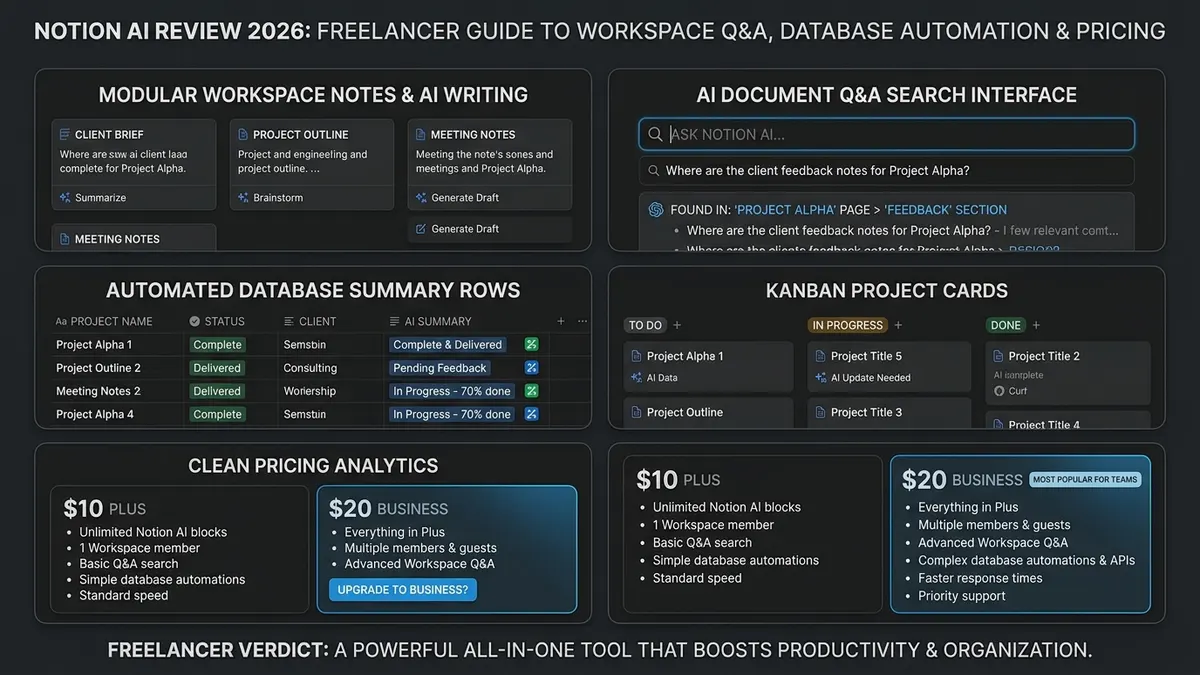
Notion’s pricing has four tiers: Free ($0), Plus ($10/user/month), Business ($20/user/month), and Enterprise (custom). Free and Plus workspaces get a small number of trial AI responses, then you’re locked out until you upgrade — there’s no permanent low-cost AI tier anymore.
That means a solo freelancer who just wants AI-assisted writing is looking at $20/month minimum, not the $8-10 add-on price still floating around in older reviews and forum threads. Annual billing knocks about 20% off, but it’s still a real monthly cost to weigh against alternatives.
- The Member vs Guest Difference: Never add virtual assistants or subcontractors as “Members” on a Business plan. Use Notion’s free “Guest” permissions to share specific client pages without triggering a $20/month seat fee.
- All-or-Nothing Billing: On Notion Business, you cannot choose to activate AI for yourself while keeping your assistant on Plus. Every registered workspace member is billed at the full Business rate.
- Standalone vs Integrated Math: Notion Plus ($10) + ChatGPT Plus ($20) totals $30/month, giving you a stronger general-purpose assistant for drafting, research and coding while retaining full Notion database structures.
04Real Cost for a Freelancer With Collaborators
Pricing per seat sounds abstract until you attach it to how freelancers actually work. If it’s just you, Business runs $240/year on the annual plan. Bring on a part-time VA or a subcontractor who also needs workspace access, and you’re paying for their seat too — $480/year for two people, whether or not the second person touches the AI features at all, since Business is an all-or-nothing plan upgrade across the workspace.
For freelancers who regularly bring on collaborators, that per-seat pricing becomes the single biggest objection. You can work around it somewhat by keeping collaborators as Guests (who have free page access but can’t create top-level pages or use workspace-level features), but it’s an operational friction point you have to manage consciously.
That per-seat pricing friction is a common complaint in independent reviews of workspace AI tools: the value is real when the AI has your whole knowledge base to search, but it drops fast the moment tiered pricing forces you to upgrade every collaborator’s seat just to keep one person’s AI access.
05Notion AI vs ChatGPT: Which One Do You Actually Need?
These solve different problems, and conflating them is where most buying mistakes happen. Notion AI wins when the task needs your workspace’s context — summarizing a doc you already wrote, answering questions against your own notes, drafting inside a page you’re editing. ChatGPT wins on everything else: coding help, image generation, deep research, math, and general-purpose writing quality.
Here’s the honest trade-off: Notion AI’s underlying models are capable, but they are tuned for workspace tasks, not cutting-edge reasoning. If you need an AI that helps you think through a complex problem or write nuanced client-facing copy from scratch, ChatGPT or Claude produces noticeably better results.
If you need an AI that knows where you put the notes from that client call three months ago, ChatGPT can’t help you — Notion AI can.
06Notion AI Key Features
- Inline writing assistance within any Notion page for rapid summaries and tone edits.
- Q&A workspace search across your entire connected Notion ecosystem.
- Automatic meeting notes summarization that extracts action items directly into databases.
- Notion Agent (Business plan) — executes autonomous multi-step operations lasting 20+ minutes.
- Custom Agents (expanded 2026) — pre-programmed repeatable workflows for client onboarding and weekly audit digests.
- Database autofill — automatically generates summaries, tags, and status updates across rows.
07Notion AI in Practice: 3 Freelance Workflows
Feature lists don’t tell you how the tool actually fits into a workday. Here’s what it looks like in three common freelance scenarios:
1. Client onboarding. You bring on a new client and need a welcome doc, project brief, and shared task list set up fast. With a Custom Agent configured once, you can trigger the whole template — brief, timeline, and initial tasks — populated from an intake form or raw call notes in a couple of minutes.
2. Meeting follow-up without the admin drag. Dump messy transcript notes from a client call into a Notion page, hit summarize, and Notion AI pulls out action items and decisions cleanly. If you run a task database, it can format those action items directly as database entries ready to assign and date.
3. Finding buried context fast. When a client asks “what did we decide about the deliverable format back in March?”, Q&A search answers directly from your notes with page citations, rather than you opening four different pages and scanning manually.
How much time that actually saves depends heavily on how clean your workspace is — a well-organized database with clear permissions makes Q&A search fast and reliable, while a messy one full of duplicate or orphaned pages will give you weaker, less trustworthy answers.
08Notion AI vs the Alternatives: Quick Comparison
| Tool | Price | Best For | Key Weakness |
|---|---|---|---|
| Notion AI (Business) | $20 / user / month | Searching and summarizing your own workspace | Requires full Business plan; high cost with multiple seats |
| ChatGPT Plus | $20 / month | General-purpose writing, coding, complex research | No native access to internal Notion pages |
| Fello AI | ~$10 / month | Budget-conscious users wanting AI workspace search | Third-party integration; less fluid than native UI |
| Joplin (Free) | $0 | Freelancers wanting local notes without any AI subscription | No built-in AI, lacks relational databases |
If your primary requirement is project management and task dependencies rather than pure documentation, ClickUp offers an alternative ecosystem with its native Brain AI assistant. Read our comprehensive ClickUp review (2026) to compare its sprint automation and pricing against Notion.
09Cheaper Alternatives to Notion AI
If the Business-plan price tag is the sticking point, you have real options short of abandoning Notion altogether:
- Keep Notion Plus, add a standalone AI subscription. ChatGPT Plus or Claude Pro run about $20/month and aren’t tied to Notion at all — you lose the in-workspace search, but gain a more capable general-purpose assistant for drafting, research and coding.
- Third-party Notion AI tools. Extensions like Fello AI offer search across your Notion content at a lower price point, though the integration is less seamless than native Notion AI.
- Local or open-source notes with your own API key. Tools like Obsidian or Joplin paired with an AI plugin and an OpenAI or Anthropic API key let you pay only for what you actually use — often $2-5/month for a typical freelancer’s volume.
- Yes, Upgrade if: You have 50+ active client pages, rely on complex relational databases, and lose 30+ minutes a week manually locating past client agreements and meeting notes.
- No, Skip if: You primarily use Notion for personal checklists or single-page notes. Standalone ChatGPT Plus will serve your drafting and research needs far better.
10When to Skip Notion AI
Not every account is positive, and the cost objection is real. A detailed Medium writeup describes canceling Notion AI entirely after switching to Joplin, a free open-source note-taking app, backing up the decision with screenshots and a direct pros-and-cons comparison.
eesel AI’s review flags a related pattern worth taking seriously: some of Notion’s automation friction — broken integrations, sync delays — has led users toward dedicated single-purpose tools rather than leaning further into Notion’s all-in-one pitch. If you’re already feeling that friction with Notion as a workspace, adding an AI layer on top won’t resolve it.
11Notion AI Review FAQ
How much does Notion AI cost in 2026?
In 2026, the standalone $8 to $10 per month Notion AI add-on has been discontinued. Full access to Notion AI—including the autonomous Notion Agent, AI Meeting Notes, and workspace Q&A—now requires the Business plan, which costs $20 per user per month billed annually ($240/year) or $24 per user per month billed monthly. The Free ($0) and Plus ($10/month) plans only provide a very limited temporary trial of AI queries.
Is Notion AI worth it if I already pay for ChatGPT Plus or Claude Pro?
For most freelancers, no. If you already subscribe to ChatGPT Plus ($20/month) or Claude Pro, paying $20/month for Notion AI Business duplicates general drafting, coding, and brainstorming capabilities. Notion AI only becomes worthwhile if you have a massive library of private notes, project databases, and client deliverables stored in Notion that you need to search and query semantically without manual copy-pasting.
How does Notion AI differ from standalone AI chatbots like ChatGPT?
Notion AI is contextual: its primary strength is querying your existing private Notion pages, connected databases, and project notes directly inside your editor. Standalone chatbots like ChatGPT Plus operate independently from a blank prompt, providing deeper general reasoning, higher token limits, and superior multi-step coding, but cannot read your private workspace unless you manually paste data into the prompt.
Does Notion train its AI models on your private client notes and workspace data?
No. Notion’s data privacy policy explicitly guarantees that your workspace content, uploaded documents, and prompt inputs are never used to train OpenAI, Anthropic, or proprietary machine learning models. Furthermore, Notion AI respects existing workspace access controls, ensuring that AI responses only surface information from pages a specific user has permission to view.
Can I buy Notion AI for just myself without paying for team collaborators?
The Business plan ($20/user/month) applies to every full Workspace Member in your workspace. If you add subcontractors or assistants as Members, your monthly bill multiplies by the number of seats. To keep costs at $20/month, invite clients, subcontractors, and virtual assistants as free Guests with page-level access rather than full Workspace Members.
Verdict: Recommended with Caveats — Powerful for Power Users, Pricey for Solos
Notion AI earns its place for freelancers who already run their whole client operation inside Notion and are ready to pay for the Business plan to unlock instant workspace retrieval. For everyone else — especially solo freelancers or those collaborating with subcontractors — the smarter, higher-yield setup is Notion Plus for database organization ($10/mo) coupled with ChatGPT Plus ($20/mo) for world-class drafting and coding.
